

Let’s say that we have had our StoreServ in and running for a few months and everything has been ‘tickety boo’ until we have an error or as I prefer to call it a ‘man down’ scenario.
What are the issues we are going to encounter? Well these can be broken down into three areas.
1. Configuration Errors
Err we the awesome StoreServ administrator has configured the 3PAR in an unsupported manner.
2. Component Failure
Not so bad, as it wasn’t caused by us! We have a component failure e.g. DIMM, Drive etc
3. Data Path
We have an interconnect failure or perhaps even faulty e.g. SAS cable
In the following section we are going to cover these in a little more detail.
Configuration Errors
These would mostly come from incorrect cabling, adding more cages than is supported and adding a cage to the wrong enclosure. The good news is that configuration errors are detected by the StoreServ and you will receive an alert.
Let’s say that you have cabled incorrectly, most likely if you loose a cage, then you will loose connectivity to all the other cages downstream. The correct cabling diagram is shown below.

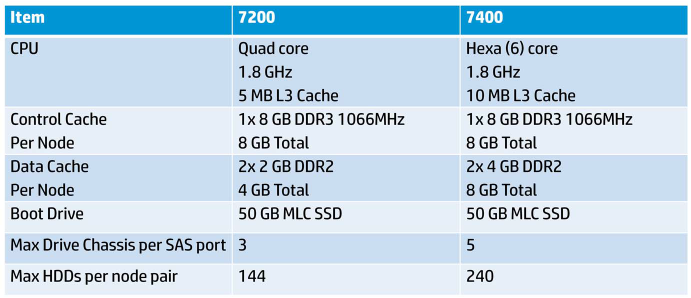
Fixing an issue where you have to many Disk Enclosures above the supported maximum e.g. six enclosure on a StoreServ 7200 two node, this is pretty simple, unplug it!
It’s pretty obvious really, but make sure that all your devices are supported, two which aren’t are:
- SAS-1
- SAS connected SATA drives
Component Failure
I think the first thing to remember is that connectivity issues can be caused by component failures.
Components can be broken down into two areas Cage and Data Path. The good news is that if everything is cabled correctly we have dual paths. The only exception to this is the back plane.
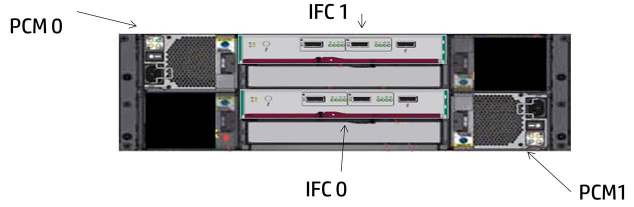
Any failure of a Cage component e.g. Power Supply, Fan, Battery, Interface Card, will result in an alarm and an Amber LED being displayed until the component can be replaced.
Right so what happens then if we have a back plane failure? Well if it’s the original StoreServe 7000 enclosure you want to shut the system down and phone HP!
If you a Disk Enclosure back plan failure then your choices are as follows:
- If you have enough space on existing disks, then the disks can be vacated and the back plane replaced.
- If you don’t have enough space on existing disks, but another Disk Enclosure can be added. Then add another Disk Enclosure, vacate the disks and then remove the failed Disk Enclosure.
- If you have no space and you cannot add another Disk Enclosure, then err work quickly!
Data Path Faults
The data path is essentially the SAS interconnects. It is comprised of:
- SAS Controller or HBA
- SAS Port
- SAS Expander (Drive Enclosures)
- SAS Drives
- SAS Cables
W e have two types of ‘phy’ ports, narrow and wide. Narrow consists of a single physical interconnect and wide consists of two physical interconnects. I prefer working in pictures as they make more sense to me.
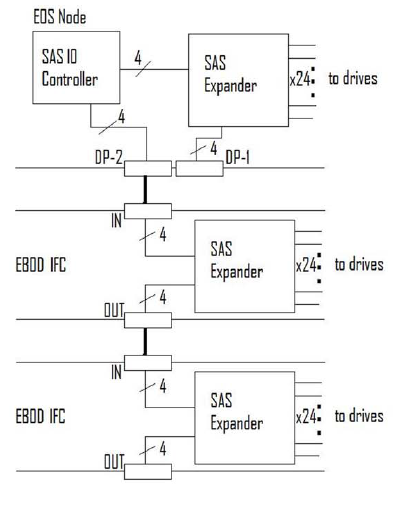
We can see the SAS Controller and Disk Enclosures are connected via 4 x Wide Physical Ports (Phys). Whereas the individual Disk Drives are connected to SAS Expander (Drive Enclosure) the by a 1 x Narrow Physical Port (phys).
In exactly the same way as we can have ethernet alignment mismatches when negotiating e.g. 2 x 1 Gb links, one negotiates at 100 Mb Half Duplex the same occurrence can happen with SAS. eg. 4 x Wide Ports into 4 x Wide Ports and one port doesn’t negotiate correctly.
If you do receive a mismatch then this will result in poorer performance, CRC errors or device resets.
Perhaps one of the hardest issues to resolve are intermittent errors which only become apparent when the StoreServ is under load. In the above scenario where we have 4 x Wide Ports connected to another 4 x Wide Ports but one port hasn’t negotiated correctly then it’s won’t be until we need to utilize 75% or more of the link that we experience the problem. The good news is that these issues can be detected in the ‘phy error log’.
To view the link connection speeds issue the command showport -c
Naturally the link speeds should represent your fabric interconnects.










 VMFocus