Lab Upgrade

It’s time for an upgrade to the vmfocus.com lab.  The existing hardware has been great, however when trying to run View, alongside SRM, every compute area became a bottleneck.

I’m fortunate enough to have been offered some free colo which is pretty awesome.  The plan is to be able to use Horizon View, Workspace and SRM along with vCenter and a few other components.  So with this in mind, the new lab will consist of the following:

ESXi Hosts

  • 2 x HP ProLiant DL380 G6
  • 4 x Intel Xeon L5520 Quad Core 2.26GHz giving a total of 32 Hyper Threaded Cores
  • 2 x 72GB RAM
  • 16 x 1GB NIC’s (2 x Quad Port Built in, 2 x Quad Port,)
  • 2 x P400 Smart Array 256MB BBWC 3Gb/s
  • 8 x 72GB 15K SAS HDD
  • 8 x 2.5″ Drive Caddies
  • 4 x PSU
  • 2 x iLO

Storage

  • 2 x Samsung EVO 250GB 2.5″ SSD 6Gb/s
  • 2 x Hitachi Travelstar 7.2K 1TB 2.5″ SATA 6Gb/s
  • 8 x HP 72GB 10K SAS

Network

  • 1 x HP v1910 24G Layer 2 switch with static routing

Configuration – ESXi01

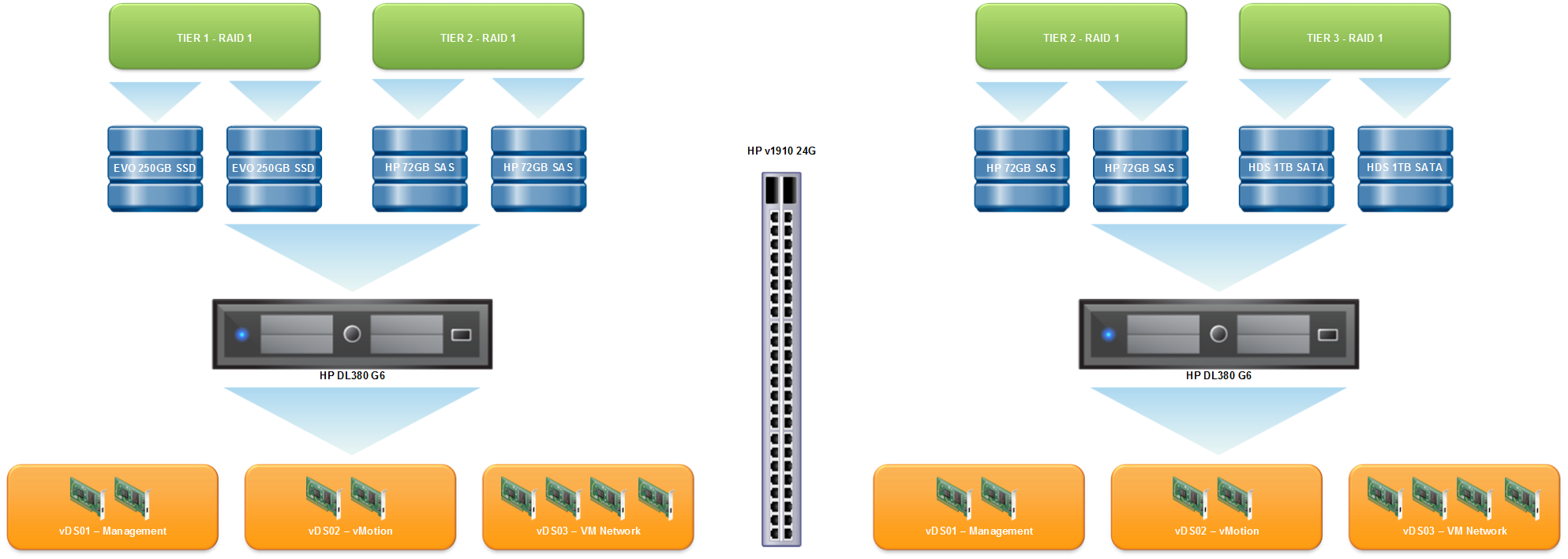
The plan is to boot ESXi from internal SD card and use RAID 1 local storage.

Tier 1 Storage – RAID 1 using 2 x Samsung EVO 250GB SSD

Tier 2 Storage  – RAID 1 using 2 x HP 72GB 10K SAS

vSwitch 1 – 2 x NIC’s for Management traffic up linked to HP v1910 24G

vSwitch 2 – 2 x NIC’s for vMotion up linked directly to ESXi02

vSwitch 3 – 4 x NIC’s for Virtual Machine traffic up linked to HP v1910 24G

Configuration – ESXi02

The plan is to boot ESXi from internal SD card and use RAID 1 local storage.

Tier 2 Storage –  RAID 1 using 2 x HP 72GB 10K SAS

Tier 3 Storage  – RAID 1 using 2 x HDS 1TB 7.2K SATA

vSwitch 1 – 2 x NIC’s for Management traffic up linked to HP v1910 24G

vSwitch 2 – 2 x NIC’s for vMotion up linked directly to ESXi02

vSwitch 3 – 4 x NIC’s for Virtual Machine traffic up linked to HP v1910 24G

This is the logical design for the upgraded vmfocus.com lab
VMFocus DL380 G6

You might be thinking this doesn’t give me HA or certain DRS features.  You would be right in saying that.  When the budget allows, I will buy a shared storage platform.

Fingers crossed I should have this up and running within the next few weeks.

Moving On

Today is my last day at Mirus IT, the last four years with the business have been some of the best, yeah I know it sounds corny, but it really has.

Mirus is a dynamic business and as such have supported me in everything I wanted to learn and have allowed me to go out and design and install some awesome customer solutions, such as:

  • Datacenter consolidation projects
  • Replicated HP 3PAR SAN’s
  • More Lefthands, oops I mean StoreVirtual than I care to remember
  • DR with Site Recovery Manager
  • Veeam Backup & DR Backup (essentially backups available in DR)
  • Exchange DAG’s
  • SQL Clusters
  • VPLS/MPLS solutions
  • Clustered Cisco ASA Firewalls
  • Network transformation projects, extended VLAN’s across non geographic locations
  • VMware Horizon View

The list goes, on, as with any business they have some great people, a few of which I would consider friends, in engineering, sales and pre-sales.  These are the people who make going to work even more fun.

So why have I decided to end this chapter? Well it’s time to depart on a ‘high note’ four years is a long time and I feel that Mirus have had the best from me and I have given the best to them.  I feel that when you are an employee, you need to recognize when you will potentially stagnate and either decided to accept this or move on to do something new.

An opportunity arose at SCC to join them as a Solution Architect.  If you aren’t aware SCC are Europe’s largest independent technology solutions provider.

So what will I be doing at SCC? Well I will be working with a group of Solution Architects engaging in pre-sales activities designing solutions for customers with a focus on vSphere/Horizon View/Workspace and naturally the networking, storage and applications that come with them, something I’m looking forward to getting stuck into.

SCC have already exceeded my expectations by arranging a ‘welcome’ evening drinks so that I could meet the ‘team’ before I started, something which on reflection isn’t generally done by most employers.  I’m sure most of you have had the same experience as me, the first day you meet HR and go over the obligatory manual handling procedures and then you meet colleagues over the coming days, weeks and months.

The new challenge starts next Monday 19th, it’s going to be epic!

Pre Sales – Design Considerations

Following on from the previous blog post ‘Whats This Pre Sales Thing All About?‘ which was aimed at understanding what a Pre Sales Engineer does, I thought it would be relevant to put together a blog post on the design considerations.

This isn’t meant to be a technical post, more so, what are the infrastructure pieces you should be questioning, so that your solution isn’t missing any essential pieces.  This isn’t going to be a complete coverall, but hopefully should send you down the right path and get you asking more questions about your design!

Business Considerations

Generally speaking, I normally lead with business considerations, this is trying to understand what the client is trying to achieve, essentially, what are you looking to achieve and anything that could influence the design.

  1. What is the business driver behind the work?
  2. Does the business have to comply with any legislation?
  3. Does the business comply with any governance such as infrastructure security risk policies?
  4. Does the business have plans for contraction or expansion over the next three to five years?
  5. Will the business be opening any new offices?
  6. Is the business considering any mergers or take overs?
  7. What growth is required from the infrastructure in terms of capacity and performance
  8. Anything else you think we should be made aware off?

Applications/Software

These are often the reason you are sitting in front of the customer having a discussion about the infrastructure required for the new piece of software.

  1. List your applications in terms of priority.
  2. How long can these applications be out of action?
  3. Are you adding any new applications?
  4. What are the application inter dependencies?
  5. What applications are you upgrading/changing?
  6. Are any applications latency sensitive?
  7. Does application clustering need to be considered?
  8. How is the application going to be packaged?
  9. How is the application going to be delivered to the users device?
  10. How is the application going to be managed ongoing?

Networking

The network is key, always consider optimal routing paths e.g. if you have a managed firewall at a colo, but your DMZ sits in production.  Consider having a firewall in production for the DMZ so that traffic from WAN > DMZ > LAN doesn’t trombone the VPLS/MPLS.

  1. What VLAN’s/subnet’s are used and for what purpose?
  2. What is the bandwidth between sites?
  3. What is the latency between sites?
  4. Are links Layer 2 or Layer 3?
  5. What routing protocols are used?
  6. Is QoS being used?
  7. What are you using for DHCP at each site, are relays in place?
  8. Does remote access need to be considered? If so who requires it?
  9. Is clientless access a requirement for remote access?
  10. Is two factor authentication a requirement?
  11. Does a reverse proxy need to be included to facilitate software such as Lync?
  12. Do load balancers (local/global) need to be considered?
  13. Are HA firewalls required with no session loss?
  14. Is IDS required?
  15. Are diverse WAN links required at all sites?
  16. What encryption/authentication is required for VPN’s?
  17. Does the encryption domain needed to be NAT’d?
  18. Is LACP being used between Core and Edge switches?
  19. Would stretching VLAN’s help the design for backups, replication, WAN failure?
  20. Are enough network ports available?

Storage

Almost as key as networking, consider your performance and capacity requirements now and also for the future.

  1. What capacity is required?
  2. What are the back end/front end IOPS?
  3. What latency is required?
  4. What is the read/write ratio and the write penalty?
  5. Is snapshot/replication needed if so does it need to be ‘sync’ or ‘a sync’?
  6. Can the SAN grow to meet the capacity/performance requirements?
  7. What availability does the SAN need to provide e.g. does it need to be clustered?
  8. Does the customer have an existing iSCSI/Fabric switches that can be utilized?
  9. Does block size need to be adjusted?
  10. Is VAAI a requirement?
  11. Is Thin Provisioning supported and can the SAN stay thin using T10 UNMAP?
  12. Is de-duplication a consideration?
  13. Does an existing SAN need to be decommissioned? If so how are the volumes/data going to be migrated?

vSphere

If the storage and networking are right, then the vSphere design should be a walk in the park.  Remember if you are performing a capacity assessment on a Windows Server 2003 environment and the customer is moving to Windows Server 2012, then you need to allow for extra to memory/cpu/disk to accommodate this.

Note any items already mentioned in previous sections, should also be considered for the vSphere environment.

  1. What redundancy is required? N+1, N+2 etc
  2. How many vCenter’s are needed?
  3. What database is going to be used for vCenter components?
  4. How many hosts are needed?
  5. How many virtual machines will be required?
  6. What is the memory overhead of the VM’s?
  7. Are queue depths a consideration? (How many VM’s will be placed on each datastore)
  8. Moving from VMFS3 to VMFS5?
  9. Considering host evacuation is scale up or out right?
  10. How are the hosts going to be patched?
  11. What permissions are required for vCenter?
  12. What service accounts are required to run all vCenter components?
  13. What networking is required at vSwitch level? LACP, Route based on virtual NIC load?
  14. Do we need to pass any devices through to VM’s directly?
  15. Do any VM’s require high performance/low latency guarantees?
  16. Are resource pools required?
  17. How is the vSphere environment going to be monitored?
  18. How may NIC’s are required for LAN,DMZ,WAN,iSCSI,NFS,vMotion,FT, Management?
  19. What identity sources are required for SSO?
  20. Do the default vCenter certificates need to be replaced?
  21. Which HA policy is most suitable?
  22. Do Storage DRS rules need to be considered?
  23. What Anti Affinity and Affinity rules are required?
  24. What firewall rules are required?
  25. What VM’s need to be restarted in what order if a failure occurs?
  26. Does VM monitoring need to implemented?
  27. How are alerts going to be generated?
  28. Where are any ISO’s etc going to be held?
  29. Is network traffic management or optimization required?
  30. Is boot from SAN a requirement?
  31. Is link state tracking required for downstream ports?
  32. Do MTU’s need to be considered?
  33. Does EVC mode need to be enabled?
  34. How many VM templates are needed?
  35. What VMDK types will be needed, Thick Eager Zeroed, Lazy Zeroed, Thin?

Backups

You have this ‘shiny’ new infrastructure how is going to be backed up?

  1. What RPO/RTO is required?
  2. Does the 3 backup copies, 2 onsite, 1 offsite rule apply?
  3. What’s the backup windows (if any)?
  4. What backup media is going to be used?
  5. What types of backups are required, full, incremental, differential, reverse etc?
  6. How are the backups going to get from source to destination?
  7. What backup throughput is needed?
  8. What impact can backups have on production servers during working hours?
  9. Do backups need to be available in DR?
  10. Does backup validation need to be considered (will the backups work if needed)?

DR

This is one of the broadest subjects that can be narrowed down quickly by asking the right questions.

  1. What is the impact to the business if you aren’t able to work for 24, 48 and 72 hours?
  2. Does all of data need to be available in DR?
  3. Do all the servers need to be able to run in DR?
  4. Do you need the ability to perform test failovers?
  5. What is the data change rate?
  6. What is the time frame allowed to have users up and working in DR?
  7. What percentage of users need to work in DR?
  8. What severs need to be running DR on a permanent basis e.g. SQL, vCenter, DC
  9. Are you willing to accept a performance hit in DR?
  10. How are you going to failover services such as email/remote access?
  11. Will the servers subnets/IP address’s/default gateway/DNS need to change?

Commsupport – Free Live Instructor Led Courses

I have used Commsupport in the past for my CCNA: Security training see blog post here, and lots of my work colleagues have used them as well.  Anyhow since then we have stayed in touch as they are always willing to lend a hand with any obscure questions I have had.

Joe, the Senior Instructor has been in touch and they are launching ‘Free Live On-Line Instructor Led Courses’, I had to double take on this and re read it again to make sure I wasn’t missing anything!

Why Free Live On-Line Instructor Led Courses?

Joe Spoto Senior Instructor explains why

‘Over the last few years a new term has crept into our midst and is being repeated over and over like a mantra hailing the arrival of the next big thing on the internet. The “MOOC” (Massive open online course) the MOOC is an online course aimed at large-scale interactive participation and open access via the internet

The idea behind the MOOC is a reasonable one, allow anyone with access to the web to login and register for a course, the down side of the MOOC is that despite all of the perceived advantages of “Doing in your own time and pace” has led to a critically large number of participants failing or dropping out of their chosen courses.

The problem is simply one of structure, there is none with the MOOC, how many times have you had to do something and kept putting it off until a later date? Promising yourself that you will get around to it?, the days, week, months and even years pass and you are still procrastinating.

This is the reason that the MOOC is doomed as a primary educational tool, what is needed is something in between traditional classroom based training and the convenience of home study.

During the live online sessions you will be able to ask the instructor questions and work through problems, get to the bottom of that problem quicker and more efficiently. Our instructors will be making loads of workbooks available as additional material along with off-line pre-recorded videos for additional content and invites to private invitation only sessions.

All of the live online sessions you attend are also recorded so if you need they can be made available for download so can watch your session as many times as you wish.

These courses will be hosted by real live expert instructors, with real live interaction, you can ask questions and they will answer them, so no pre recorded sessions.

To emphasise the live classes are just that they are LIVE and NOT recordings, because the courses are live and interactive the student will be more engaged and receptive than having to watch videos alone. Since the sessions are set to run on specific times the student is more likely to login to attend since there is no ability to keep putting it off until another day.

Commsupport believe the FREE live on-line model will change the way we learn online

What Courses Will Commsupport Be Offering?

Initially the first set of free live online courses we will be running from September/October/November will be:

  • Microsoft Exchange
  • Microsoft SQL
  • Prince2 Foundation
  • ITIL
  • Cisco CCDA
  • Linux Essential LPI
  • Hacking Essentials
  • Cisco Fundamentals
  • Comptia A+
  • Comptia N+

How Do I Register?

To register simply sign up at Commsupport

What’s The Catch?

Where is the Catch you might be asking!……erm…..erm…um……er……that’s the problem here there is no catch, just register and Commsupport will send you a regular e-mail telling you about launch date.  Don’t worry they don’t send out any marketing stuff.

Unitrends T-Shirt Giveaway

The folks over at Unitrends are giving away some t-shirts with the aptly named slogan ‘Use Protection’ which appealed to my sense of humor!

Use Protection

To get a new t-shirt for your wardrobe/collection, follow the instructions below:

  1. Go to Unitrends
  2. Download Unitrends Enterprise Backup (UEB) for VMware or that other hypervisor.
  3. Deploy UEB & be one of the first 500 to Register any license type (including the Free Edition.

use-protection-banner