Microsoft Azure Concepts – Operations Management Suite

omsWhen deploying workloads to the public cloud, the question arises ‘how do you monitor them’?  This then leads to further questions such as:

  • Will my existing monitoring solution support Microsoft Azure workloads such as PaaS?
  • Do I need to purchase extra licenses or upgrade my existing licenses?
  • Do I need to have two different monitoring solutions? One for on-premises and one for the public cloud?

Each of the above questions then leads to a myriad of further questions around the deployment mechanism, how data is collected, stored and displayed.  How are you altered of issues or potential issues?  How do you capacity plan for resources in the cloud?  How do you monitoring specific application workloads?

To answer these questions and more Microsoft released Operations Management Suite which became generally available in January 2016.

What is Operations Management Suite?

Operations Management Suite is ‘Management as a Service’ or MaaS for short.  It runs in Microsoft Azure and can provide visibility into your on-premises and Microsoft Azure based workloads, providing a consistent monitoring approach across datacentres.

OMS is broken down into four key components which at a high level are:

  • Insight and Analytics to collect, correlate, search and act on log and performance data generated by operating systems and applications. Providing real time analysis of information and potential issues.
  • Automation & Control which enables a consistent approach to control and appliance by leveraging desired state configuration, change tracking and update management.
  • Security and Compliance focuses on identifying, assessing and mitigate risks to infrastructure. Collecting and analysing security events to identify suspicious activity.
  • Protection and Recovery to provide analysis and status updates of Azure Backup and Azure Site Recovery

The diagram below depicts a logical overview of the proposed Operations Management Suite environment.

azure-oms-logical-v0-1

Note: At the time of writing OMS supports Azure Backup and Site Recovery in Classic Mode.

Operations Management Suite Components

The components of Operations Management Suite are broken down into three areas, agent, dashboard and solution packs.

  • Agent is an in-guest service which can be pushed out automatically using Group Policy, System Center Configuration Manager or another deployment method. It is used to provide heartbeats and data back to the centralised Operations Management data repository
  • Dashboard is the Operations Management Suite portal which runs in a browser. The dashboard can be customised with graphical views of valuable searches and solutions
  • Solution Packs are add-on services which add functionality and provide in-depth analysis of collected data. Examples of commonly deployed Solution Packs are:
    • Malware Assessment which provides status of antivirus and antimalware scans across servers
    • Change tracking with tracks configuration changes across servers
    • System Update Assessment which identifies missing system updates across servers
    • AD Replication Status which identifies Active Directory replication issues
    • SQL Assessment which assesses the risk and health of SQL Server environments
    • AD Assessment which asses the risk and health of Active Directory environment

Microsoft are continuously updating Solution Packs and a few which are in public preview are listed below:

  • Azure Networking Analytics which enables you to gain insight into Network Security Groups and Application Gateway logs
  • Capacity and Performance which enables you to view Hyper-V CPU, memory and storage utilisation
  • Office 365 which provides visibility into user activities as well as forensics for audit and compliance purposes
  • Network Performance Monitoring which offers real time monitoring of parameters such as loss and latency
  • System Centre Operations Manager Assessment which asses the risk of your SCOM environment
  • VMWare Monitoring provides the ability to explore ESXi Host logs for monitoring, deep analysis and trending

The graphic below provides an example Operations Management Suite dashboard.
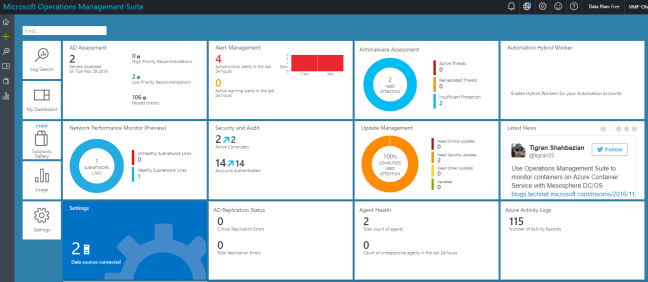
oms-dashboard

Workspaces

OMS uses the concept of workspaces which is primarily an administrative boundary but is also used to collect data within an Azure region.  Workspaces can be used to delegate responsibility to individual users or groups who undertake specific roles e.g. Network Team access to Network Performance Monitor.

It should be noted that workspaces are independent of each other and that data collected from each workspace cannot be viewed in another workspace.  However you can link multiple workspaces to a single Microsoft Azure subscription.

Workspaces also enable the use of different license plans, for example in one workspace you might use the System Center Add On and another workspace you might use Insight & Analytics.

Data Collection

Operations Management Suite collects data on a real time basis using either in-guest agents installed on Windows or Linux, a System Center Operations Management Group which uses the SCOM management servers to forward events and performance data to Log Analytics or finally an Azure Storage Account that collects data from PaaS and IaaS services.

  • Logging which is data generated by the operating system or application such as event logs, IIS logs, syslogs or custom logs in the form of text files.
  • Performance which uses the Windows or Linux performance counters to collect data such as memory, processor and disk information
  • Solution specific items which provide in-depth analysis of application items

A logical overview of data collection is shown below.

azure-oms-data-collection-v0-1

Licensing

OMS can be licensed either on a pay as you go basis or on a subscription basis.  You are given the choice of licensing all OMS components together as a ‘suite’ which makes the overall cost cheaper or you can pick which components you need.

  • Licenses are based on nodes, a node is defined as a physical computer, virtual machine or network device
  • Node charges are hourly and nodes that only report for a part of a month are proratared
  • Each node can produce up to 500MB of data per day without incurring any extra charges
  • OMS data retention is currently set to one month, plans to expand this to two years are in the pipeline

Final Thought

OMS is maturing as a product and integration points to on-premises environment is evolving.  The ability to provide a centralised dashboard with application or vendor specific solution packs will make the product more appealing.  Watch this space!

Cheap(er) Microsoft Azure Exams

azure-skillPart of working in IT means keeping your skills relevant and up to date, which usually leads into taking exams on a regular basis.  Depending on your situation, exams maybe self or employer funded, so when a vendor has a certification offer, it’s worth taking note.

The usual cost of a Microsoft Azure exam with Pearson Vue is £135.60 inc. VAT (in the United Kingdom see Designing and Implementing Cloud Data Platform Solutions.

Later last year Microsoft launched ‘Advance your Azure skills‘ in a bid to get more individuals certified on their public cloud platform.  Using this URL will give access to the same exams but for £96.20 inc. VAT with a number of additional benefits which are:

  • Practice test for 30 days
  • One free retake
  • Access to Microsoft online Azure course catalogue

So what are you waiting for?  Now is the time to start cracking on with your Microsoft Azure exams!

70-533: Implementing Microsoft Azure Infrastructure Solutions – Prep & Exam Experience

mcsa-cloudplatform-logo-blkspec_impl_azure_infrasol_bwReaders of this blog know that my focus has shifted towards hybrid cloud and the architecture to enable customers to consume Microsoft Azure for varying requirements.

Having passed 70-534: Architecting Microsoft Azure back in March 2016, I had been putting off the  70-533 Implementing Microsoft Azure
Infrastructure Solutions
 due to the sheer volume of Azure work I was undertaking with customers which didn’t leave much time for studying.  Anyhow, I thought it was about time I sat the 70-533 exam which covers:

  • Implement Web Apps
  • Implement Virtual Machines
  • Implement Cloud Services
  • Implement Storage
  • Implement Azure Active Directory
  • Implement Virtual Networks

Preparation

I went back over my previous blog posts on the following topics to make sure I was up to speed on the basics again.

Microsoft Azure Concepts – Availability Sets

Microsoft Azure Concepts – Backups

Microsoft Azure Concepts – Clusters

Microsoft Azure Concepts – Content Delivery Network

Microsoft Azure Concepts – Failures

Microsoft Azure Concepts – Identity & Access

Microsoft Azure Concepts – Media Services

Microsoft Azure Concepts – Mobile Apps

Microsoft Azure Concepts – Networks

Microsoft Azure Concepts – Network Security Groups

Microsoft Azure Concepts – SQL Data Warehouse

Microsoft Azure Concepts – Storage

Microsoft Azure Concepts – Virtual Machines

After I gotten my head around these again, I decided it was time to focus on the exam objectives that would present the greatest challenge which was performing tasks in PowerShell.

The difficulty was that the exam covers both the Azure Classic Deployment and Azure Resource Manager, so I found myself doubling up on commands.

ProTip: Like me, if you are not a PowerShell guru, then I suggest you use PowerShell ISE as it’s far more intuitive than just a command prompt!

I purchased the book Implementing Microsoft Azure Infrastructure Solutions by Michael Washam and Rick Rainey.  This is an excellent introduction to the exam, but I wasn’t convinced it would be enough to see me through the exam.

To compliment the book, I watched a number of Pluralsight videos on Implementing Microsoft Azure Infrastructure Solutions by Tim Warner which really helped plug any gaps I had.

As well as reading and watching the training material, I also spent time using Azure.  I’m lucky enough to have a work sponsored Azure Subscription I can access to play around.  I strongly suggest you are familiar with Azure and also you understand the basics of PowerShell commands.

The Exam

I decided to take the Microsoft Online Proctored exam with Pearson Vue.  I have to say that the security requirements where far higher than attending a Pearson Vue site, I literally had to empty my pockets and show the invigilator every part of the room I was sitting in twice.

A few things you should note about taking a proctored exam:

  • If you have an external monitor, they will make you turn it around
  • If you have a cup of coffee they will ask you to remove it from the room
  • They expect your desk to be completely clear, so no pen or paper for making notes

The exam itself was broken down into forty eight individual questions consisting of your usual multiple choice or drag and drop.

The exam expects you to know the blueprint and the material contained within it.  You also need to be able to understand when and why you would make technical decisions for example:

When would you choose yo use Point-to -Site over a Site-to-Site VPN.

Final Thought

I’m pleased to say I passed the 70-533 Exam.  It was challenging due as I don’t spend all my time implementing Azure solutions (especially on the PowerShell front).  In fact a lot of my time is spent researching new Azure features for customers to see if they stand up from a technical and commercial perspective.

Overall, I would recommend the exam to anyone looking to develop their understanding of Microsoft Azure.

It appears that when you pass both the 70-533 and 70-534 exam you become certified a MCSA: Cloud Platform.  So my advice, is pick up the books and crack on with some studying, things are moving to the cloud whether we like it or not!

Microsoft Azure Concepts – Internet of Things

iotAccording to the IDC, the Internet of Things market will grow to £1.3 Trillion in 2020 with over 25 Billion connected devices.  Gartner also share this belief and predict that we will have 21 Billion connected devices in 2020 with a market valued at £2.4 Trillion.

With the advent of smart homes and the requirement to provide remote monitoring and predictive maintenance to every day items, the question this raises in my mind are:

  • How do you provide reliable connectivity to these devices?
  • How do you provide updates to these devices?
  • How do you collect and analyse the information?
  • How do you monitor and alter on the data sets?
  • How do you scale or contract the solution?
  • How do you provide availability and DR for the solution?

To answer these questions and more Microsoft released Internet of Things in February 2016.

What Is Microsoft Azure Internet of Things?

Microsoft Azure Internet of Things (IoT) comes in two flavours which are a pre-packaged solution using the IoT Suite or the IoT Hub which provides the connectivity and monitoring from IoT clients.

IoT Suite

The overall aim of the IoT Suite is a starting point for proof of concepts or early customer initiatives.   The IoT Suite is offered as two pre-configured solutions which are:

  • Remote Monitoring
  • Predictive Maintenance

Each of these solutions pulls together different Azure services to create the overall suite.  These include:

  • Azure IoT Hub
  • Azure Stream Analytics
  • Azure Blob Storage
  • Azure Document DB Storage
  • Azure Logic Apps
  • Azure Web Apps and Jobs

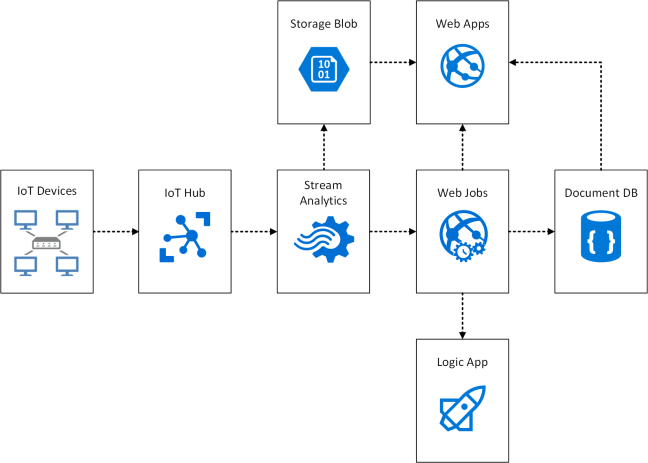
An example architecture of how these components fit together is shown below.

Azure IoT Suite.png

It’s important to note that Microsoft do not provide a packaged cost for IoT Suite.  Each component would need to be priced individually.

I’m sure you will agree, quite a few moving parts, so let’s break it down into bite size chunks.

  • IoT Devices these could be individual items or they could use an IoT Gateway.  The best way to think about a IoT Gateway is a car, you wouldn’t send each individual electrical component out to the cloud.  Instead the car would act as the IoT Gateway and the components within the car send their telemetry to it.
  • IoT Hub massive ingestion platform which provides bi-directional communication to IoT Devices.  The IoT Hub performs the initial collection of data and stores it in Azure Storage Blob
  • Storage Blob used to store the data in it’s raw format.  Before the data is processed this is your one source of truth, using cheap cloud storage makese sense increase you want to integrate the data multiple times.
  • Steaming Analytics to integrate the IoT data in real time and also providing a secondary analytic method
  • Wep App providing the user interface for users to access the platform via a web page or on mobile devices
  • Logic App providing the integration points and workflows into business systems
  • Document DB is where the device meta data could be held

IoT Hub

IoT Hub is essentially the control plane, enabling IoT Devices to connect using AMQP, MQTT and HTTP protocols.  Communication to IoT Hub is based on service assisted communication patterns which are detailed in this excellent blog post.  Perhaps the most prominent points are:

  • Security takes place over all other capabilities
  • Devices do not accept unsolicited network information
  • The communication path is secured at the application protocol layer
  • System level authorisation and authentication are based on per device identities

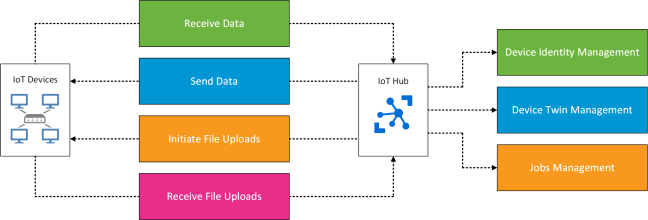
From an IoT Device perspective, the IoT Hub is responsible for:

  • Sending data to the IoT Device
  • Receiving data from the IoT Device
  • Initiating file uploads
  • Receive an update twin properties (items such as location details)

The IoT Hub is responsible for the following areas:

  • Receiving data from the IoT Device
  • Sending data to the IoT Device
  • Receive delivery acknowledgements
  • Receive file notification
  • Device identity management
  • Device twin management
  • Jobs management

This can be logically depicted in the following diagram.

azure-iot-hub

Device Management

IoT Hub enables you to manage end devices to perform the following business as usual operations:

  • Reboot Device
  • Factory Reset Device
  • Configure Software on Device
  • Firmware Update Device
  • Reporting Progress (data waiting to be collected)
  • Reporting Status (last time data was collected)

The supported devices within Microsoft Azure which have been tested against Azure IoT SDKS can be found in this article.

Monitoring

IoT Hub offers the ability to monitor the status of operations in real time on the following metrics:

  • Device Identity
  • Device Telemetry
  • Cloud to Device Commands
  • Connections
  • File Uploads

For example the ‘Connections’ monitoring could be used to identify devices which fall outside of acceptable upload thresholds meaning that the device is likely to have a hardware failure.

High Availability

I have to say that I was somewhat impressed that IoT Hub has inbuilt regional high availability as part of the standard service offering.  The recovery time objective offered is between two and twenty six hours, so bear in mind that you could be down for over a day.

If an outage of up to 26 hours isn’t acceptable to your business, then you could consider implementing a secondary IoT Hub.  Some considerations around this include:

  • Fronting IoT Hub with Azure Traffic Manager on a Web App that that checks the active IoT Hub
  • Exporting and importing the device identity from the primary IoT Hub region to the secondary IoT Hub region on a regular basis
  • Fail back logic when the primary IoT Hub region is restored

How Is It Priced?

Microsoft use four tiers for pricing IoT Hub which are based around the total number of messages per day.  This includes messages both to and from IoT Devices.

The table below is taken from Azure IoT Hub Pricing and is correct as of 25/10/2016.

EDITION TYPE PRICE (PER MONTH) TOTAL NUMBER OF MESSAGES/DAY MESSAGE METER SIZE
Free Free 8,000 0.5 KB
S1 £30.55 400,000 4 KB
S2 £305.45 6,000,000 4 KB
S3 £3,054.50 300,000,000 4 KB

Even thought the table mentions monthly pricing, IoT Hub is billed per day.  This means that you can choose to scale up or down between paid tiers at will.  It should be noted that Microsoft does not scale you automatically, instead they apply quotas and limits if you are using to many messages on your scale.  In converse if you aren’t using enough messages per day then Microsoft will leave you on the same level.

Microsoft Azure Concepts – SQL Data Warehouse

azure-sql-data-warehouseIt has been widely reported that data growth is increasing year on year with more data being created in the past two years than in our entire history before this point.
Along with the increase in information is the requirement to report, analyse, manipulate and interrogate the data set.

With traditional on-premises solutions, you aim to size the Data Warehouse for peak workloads so that you have enough compute and storage performance to deal with demand.  This capital investment then leads to further question.

  • What about off-peak times, can I make use of the hardware for other purposes?
  • Who is going to manage and maintain the firmware, operating systems?
  • How are we going to expand the environment or are we sizing it for the future now?
  • What if our predicted future requirement calculations are wrong, can we expand compute and storage, also will we have the budget available?

To answer these questions and more Microsoft introduced Azure SQL Data Warehouse in July 2016.

What Is Azure SQL Data Warehouse?

Azure SQL Data Warehouse is a PaaS offering, meaning that there is no requirement to manage the hardware or operating system, you just consume what you need at any given time.

It’s built on a distributed architecture which decouples storage from compute, meaning you don’t have a hard tie between increasing compute power with storage capacity.  Therefore if you require more storage capacity but your compute resources are adequate you only pay for the extra storage.t

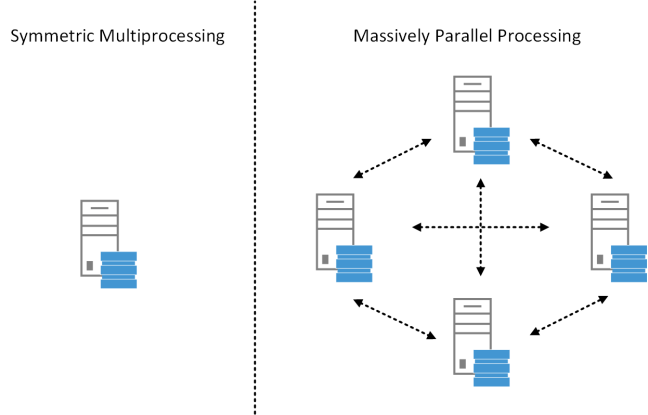
Microsoft use a Massively Parallel Processing system which means that each compute node contributes to the overall workload as shown in the diagram below.  This is versus a traditional Symmetric Multiprocessing system in which you scale resources up for example a SQL Server.

azure-smp-mpp

Each node takes a slice of the data from the database, when a query is ran a co-ordination task is undertaken to ensure that the query execution is performed in the most optimal way.

How Is It Priced?

Microsoft use the concept of a Data Warehousing Unit or DWU which is an underlying measure of the compute power of the database.

DWU are charged per hour and you can scale up or down within seconds between different tiers.

For example if it took 15 minutes to load three tables and run a report on 100 DWU then I would expect it to take 5 minutes to load the same tables and run the report on 300 DWU.

As well as the DWU cost thereis also a storage cost which is charged per GB on Azure Premium Storage.

One of the excellent features is that you can ‘pause’ your SQL Data Warehouse which means that you don’t pay for any compute resources during this time.  Let’s look at a practical example:

8am Monday – Normal working conditions ‘un-pause SQL Data Warehouse at 300 DWU’

6pm Monday – ‘Pause SQL Data Warehouse’

8am Tuesday – End of month reporting ‘un-pause SQL Data Warehouse and increase to 3000 DWU’

10am Tuesday – End of month reporting complete ‘scale down to 300 DWU’

For more details on pricing, please see SQL Data Warehouse Pricing.

Architecture

Azure SQL Data Warehouse is designed differently and also behaves differently to an on-premises environment.

Those of us who are used to making design decisions in a VMware network environment based on load distribution will be vaguely familiar with the concepts of a distribution key.  A distribution key determines the method in which Azure SQL Data Warehouse spreads data across nodes.

When data is loaded from a table into Azure SQL Data Warehouse it is split into 60 distributions (buckets of data) which are attached to different compute nodes.

Hash Distribution – A unique field within a table is used to distribute data.  The entry within the field is hashed and those fields returning the same value will be placed on the same compute node for example:

Row 1 Trainer would go to Compute Node 1

Row 2 Sock would go to Compute Node 2

Row 3 Trainer would go to Compute Node 1

Row 4 Shoe would go to Compute Node 3

The main drawback of Hash Distribution is you could end up with an data skew causing uneven workload spread across your distributions.

Round-Robin Distribution – Each row within the table is distributed to a different compute node for example:

Row 1 Trainer would go to Compute Node 1

Row 2 Sock would go to Compute Node 2

Row 3 Trainer would go to Compute Node 3

Row 4 Shoe would go to Compute Node 4

Table Types

Azure SQL Data Warehouse offers three different table types:

  1. Clustered Columnstore – Organises records by columns, has a high compression ratio but without secondary indexes.  Note this is the default table type in Azure SQL Data Warehouse.
  2. Heap – No index on the data, but much faster at loading as has no compression.  But does allow for secondary indexes.
  3. Clustered B-Tree Index – A table that is organised on a sorted column which is often the clustering key.  Enables fast single lookup, but doesn’t support compression.  But does allow for secondary indexes.

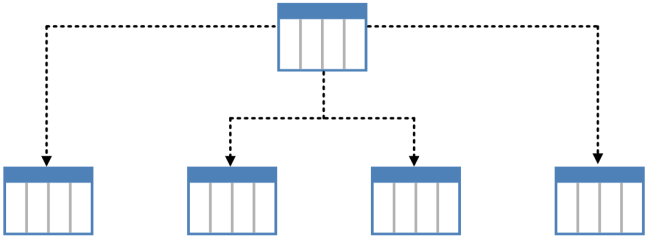
Azure SQL Data Warehouse users the concept of Table Partitioning, this is where a top level table is split into different data buckets as shown in the diagram below.

azure-table-partitioning

This approach has a number of benefits which include the ease of loading and removing data, the ability to target specific table partitions for maintenance operations and overall increased performance.

Within Azure SQL Data Warehouse it is best to use lower granularity partition schemes for example weekly or monthly rather than daily.

Loading Data into Azure SQL Data Warehouse

When loading data into Azure SQL Data Warehouse we have to bear in mind that it is a Massively Parallel Processing system which therefore means we want to load as much data in parallel as possible.

Depending on the DWU are you paying for, depends on the number of reader threads which are available to you. These are threads that read data in parallel. Note that the number of writer threads into the MPP remain the same.

DWU Readers
100 8
200 16
300 24
400 32
500 40
600 48
1,000 60

As you can see your DWU has a direct impact on how fast you can load data.

When data is read into Azure SQL Data Warehouse, you can choose to use single client loading methods such as SSIS and Azure Data Factory. Alternatively you can use PolyBase for parallel loading.

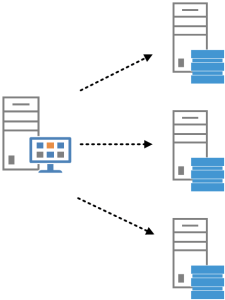
Loading data using a single-client methodology means that your ‘Control Node’ becomes your bottleneck.  A ‘Control Node’ is a special category of node that receives all the connections and sends the queries onto the compute nodes.

azure-control-node

The ‘Control Node’ is a static item and doesn’t increase or decrease depending on the amount of DWU you add or remove.  Therefore meaning that if you load with SSIS, then the ‘Control Node’ could become a bottleneck.

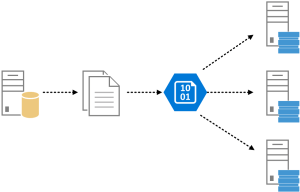
Loading data with PolyBase which is recommended for parallel loading means that data is taken straight into the compute nodes without the need for a ‘Control Node’.

Data is usually exported from SQL and then loaded into Azure Blob Storage as a CSV before being imported into the compute nodes using an automation routine.

azure-polybase

This means that using PolyBase loading scales more efficiently and is usually much faster.

Backups

Built into Azure SQL Data Warehouse is a backup functionality which provides a data warehouse consist backup every four to eight hours.  This means that you will receive between three and six backups per day which are stored for seven days.

You can also trigger snapshots of the Blob Storage on which the Azure SQL Data Warehouse resides if you want a one off or more frequent backup schedule.  Note this would be triggered by PowerShell and automated by Azure Automation see Using Azure PowerShell with Azure Storage.

Migration Utility

Microsoft provides a Migration Utility that supports SQL Server 2012 or above and Azure SQL Databases.  It provides a report pointing out possible migration issues which could be encountered when using Azure SQL Data Warehouse.  It can help to assist with schema and data migrations.