Purpose
The purpose of this blog post is to give you an insight into the lessons learnt during a recent installation of Azure Site Recovery.
Background
Existing on-premises environment runs vSphere 5.5 Enterprise Plus and has a 500Mbps ExpressRoute connection into Microsoft Azure.
Active Directory Federation Services is deployed in Microsoft Azure providing authorisation and authentication services.
Design
The design was quite straight forward, to meet customer requirements, we needed to:
- Protect three seperate vSphere VM’s three tier application (web, middleware, database)
- Perform a test failover using two groups protection groups
- Perform a planned failover and planned failback
- Perform an unplanned failover and planned failback
- Perform an unplanned failover and planned failback to an alternative datacentre
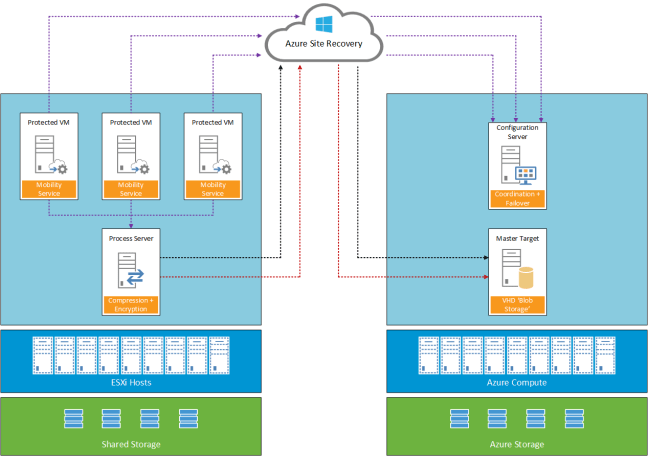
A logical overview of the topology used is shown below.
Lessons Learnt
Enable Protection Fails
Installation of the Mobility Service will fail if the virtual machine you are trying to protect as a restart pending.
Re-Protect Fails
To protect workloads for failback the on-premises Azure Site Recovery Process Server needs to be the same as the workloads it’s protecting. For example if you use a physical Process Server, you cannot failback from Azure.
Cache Disk
The installation location of Azure Site Recovery cannot be used as a cache disk.
Add Credentials to Process Server
Launch cspconfigtool from C:Program Files (x86)Microsoft Azure Site Recoveryhomesvsystemsbin
Microsoft Documentation
Fail Back VMware VMs and Physical Servers shows ability to add Configuration Server when deploying an Azure Process Server. This is incorrect, the correct procedure is to login to the Azure Process Server and enter Configuration Server IP Address and Configuration Passphrase of your on-premises Process Server.
Once linked you can confirm this by selecting Servers > Configuration Servers and your Azure Process Server should be listed under the on-premises Process Server
Microsoft Planned Reprotect Workflow
On Reprotect workflow, you select you Cache Disk for example E:.
During monitoring, the Cache Disk on your on-premises Process Server is not used. Instead a VMDK is added to your on-premises Process Server for each protected VM
Planned Test Failback
No option to perform a test fail back to on-premises
Planned Failback IP Address & Port Group
Failback no option to change target IP Address or Port Group
Planned Failback Recovery Plan
Planned failback cannot be ran at Recovery Plan level.
Planned Failback Start-up Order
As no recovery plan is available. A manual list of VM start up orders and actions needs to be maintained.
IP Address
If a VM has been failed over to Microsoft Azure previously. The IP Address it was assigned is not available for use. Even thought the output from the PowerShell command shows that the IP Address is available.
#Check IP Address Available

Test-AzureStaticVNetIP -VNetName "VMF-VNET" -IPAddress 10.3.240.102
Failback New Location
Microsoft require the original on-premises Process Server to be available to perform a failback to a new datacentre.
Final Thoughts
Microsoft has improved the Azure Site Recovery product with the ‘Enhanced’ version. However a limitation at the moment is that for each protected VM you are tied to original on-premises Process Server. Hopefully, the ability to decouple this and change Process Servers is on the roadmap.
As the product evolves it would be good to see the ability to perform Test Failbacks and use a Recovery Plan to failback to on-premises. Having to failback VM’s on an individual basis is cumbersome and error prone.


 Microsoft have made Azure and Office 365 generally available from UK datacentres in London, Durham and Cardiff.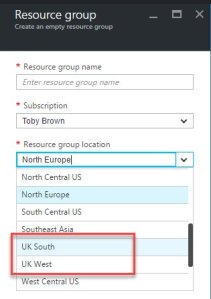


 VMFocus