Azure Site Recovery – Lessons Learnt

Purpose

The purpose of this blog post is to give you an insight into the lessons learnt during a recent installation of Azure Site Recovery.

Background

Existing on-premises environment runs vSphere 5.5 Enterprise Plus and has a 500Mbps ExpressRoute connection into Microsoft Azure.

Active Directory Federation Services is deployed in Microsoft Azure providing authorisation and authentication services.

Design

The design was quite straight forward, to meet customer requirements, we needed to:

  • Protect three seperate vSphere VM’s three tier application (web, middleware, database)
  • Perform a test failover using two groups protection groups
  • Perform a planned failover and planned failback
  • Perform an unplanned failover and planned failback
  • Perform an unplanned failover and planned failback to an alternative datacentre

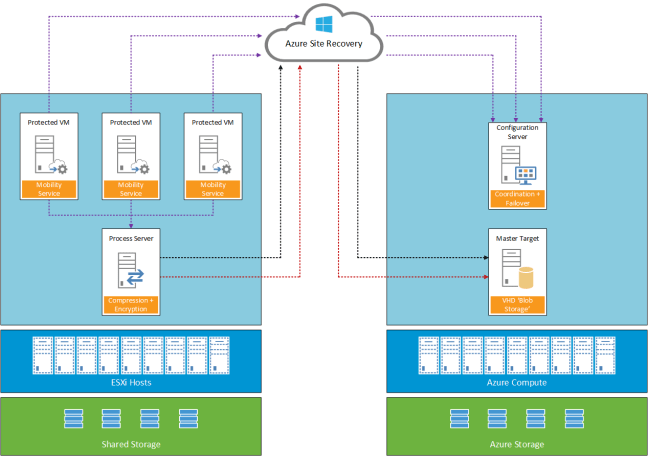
A logical overview of the topology used is shown below.

Azure Site Recovery Components v0.1

Lessons Learnt

Enable Protection Fails

Installation of the Mobility Service will fail if the virtual machine you are trying to protect as a restart pending.

Re-Protect Fails

To protect workloads for failback the on-premises Azure Site Recovery Process Server needs to be the same as the workloads it’s protecting.  For example if you use a physical Process Server, you cannot failback from Azure.

Cache Disk

The installation location of Azure Site Recovery cannot be used as a cache disk.

Add Credentials to Process Server

Launch cspconfigtool from C:Program Files (x86)Microsoft Azure Site Recoveryhomesvsystemsbin

Microsoft Documentation

Fail Back VMware VMs and Physical Servers shows ability to add Configuration Server when deploying an Azure Process Server.  This is incorrect, the correct procedure is to login to the Azure Process Server and  enter Configuration Server IP Address and Configuration Passphrase of your on-premises Process Server.

Once linked you can confirm this by selecting Servers > Configuration Servers and your Azure Process Server should be listed under the on-premises Process Server

Microsoft Planned Reprotect Workflow

On Reprotect workflow, you select you Cache Disk for example E:.

During monitoring, the Cache Disk on your on-premises Process Server is not used.  Instead a VMDK is added to your on-premises Process Server for each protected VM

Planned Test Failback

No option to perform a test fail back to on-premises

Planned Failback IP Address & Port Group

Failback no option to change target IP Address or Port Group

Planned Failback Recovery Plan

Planned failback cannot be ran at Recovery Plan level.

Planned Failback Start-up Order

As no recovery plan is available.  A manual list of VM start up orders and actions needs to be maintained.

IP Address

If a VM has been failed over to Microsoft Azure previously.  The IP Address it was assigned is not available for use.  Even thought the output from the PowerShell command shows that the IP Address is available.

#Check IP Address Available

Test-AzureStaticVNetIP -VNetName "VMF-VNET" -IPAddress 10.3.240.102

Failback New Location

Microsoft require the original on-premises Process Server to be available to perform a failback to a new datacentre.

Final Thoughts

Microsoft has improved the Azure Site Recovery product with the ‘Enhanced’ version.  However a limitation at the moment is that for each protected VM you are tied to original on-premises Process Server.  Hopefully, the ability to decouple this and change Process Servers is on the roadmap.

As the product evolves it would be good to see the ability to perform Test Failbacks and use a Recovery Plan to failback to on-premises.  Having to failback VM’s on an individual basis is cumbersome and error prone.

Azure Quick Tip – Deployment Name Different to Cloud Service Name

Problem Statement

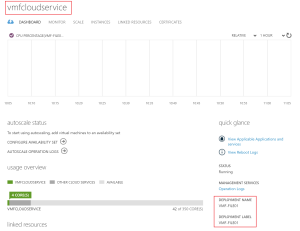
A new Cloud Service has been created, however the deployment name and label is different to the Cloud Service.

Cloud Service

Resolution

The deployment name and label is inherited from the first virtual machine created within the Cloud Service.  The resolution is to create your first virtual machine using the name of the Cloud Service and then delete it.

Cloud Service 02


Microsoft Azure Concepts – Network Security Groups

Virtual-NetworkNetwork Security Groups (NSG) are essentially traffic filters.  They can be applied to ingress path, before the traffic enters a VM or subnet or the egress path, when the traffic leaves a VM or subnet.

  • Source and destination port ranges
  • UDP or TCP protocol can be defined
  • Maximum of 1 NSG per VM or Subnet
  • Maximum of 100 NSG per Azure Subsription
  • Maximum of 200 rules per NSG
  • When a Network Security Group is applied all traffic apart from other virtual machines or services in the same VNET are denied by default

Note: You can only have an ACL or NSG applied to a VM, not both.

By default Azure has three networks which are automatically created when you make your first Network Security Group, these are:

  • INTERNET – Anything external
  • VIRTUAL_NETWORK – Allows anything on your VNET to talk to each other
  • AZURE_LOADBALANCER – Allows the Azure Load Balancer to talk to anything

Network Security Group rules are applied in priority order, so rule 100 is applied before rule 101 and 102

So let’s walk through a few examples.

Create a Network Security Group

#New Network Security Group

New-AzureNetworkSecurityGroup -Name "VMF-NSG01" -Location "West Europe" -Label "In - VMF-VNET02 Trafic"

The above commands creates a new Network Security Group called VMF-NSG01 in West Europe with a description of VMF-VNET02 Traffic

Before we move onto creating some rules, we need to think about the Cloud Service and the Endpoints which are being exposed to our Virtual Machines on subnet VMF-VNET02.

I could remove all Endpoints from all virtual machines within my Cloud Service, this means we don’t have any access from the internet.  This is great, but what if we need to expose HTTPS to the internet?

I could just add the Endpoint to the VM’s.  But this then means that if another Administrator comes along, they can expose more VM’s to the internet.  What can I do to get around this?   Well the rule below is the answer.

Allow HTTPS Inbound from Internet To a VM

#Allow Inbound HTTPS from Internet to VMF-TEST02

Get-AzureNetworkSecurityGroup -Name "VMF-NSG01" `
| Set-AzureNetworkSecurityRule -Name "In - HTTPS VMF-TEST02" `
    -Action Allow -Type Inbound -Priority 301 `
    -SourceAddressPrefix 'INTERNET' -SourcePortRange '*' `
    -DestinationAddressPrefix '10.30.2.161/32' -DestinationPortRange '443' -Protocol TCP

This rule allows anyone from the Internet to access the virtual machines named VMF-TEST02 on HTTPS.  However if any more Endpoints are added to the Cloud Service, they won’t work as we don’t have a rule for them.

So that’s inbound internet access locked down, what about access into the VMF-TEST02 subnet from the rest of the VNET and our on-premises network?

Allow Citrix HDX from Any

#Allow Inbound Citrix HDX from Any

Get-AzureNetworkSecurityGroup -Name "VMF-NSG01" `
| Set-AzureNetworkSecurityRule -Name "In - Citrix HDX" `
 -Action Allow -Protocol '*' -Type Inbound -Priority 310 `
 -SourceAddressPrefix '*' -SourcePortRange '*' `
 -DestinationAddressPrefix '*' -DestinationPortRange '1494'

The above rule allows any Citrix HDX traffic on Port 1494 to enter our subnet VMF-VNET02. Now you might be scratching your head thinking why don’t I change the -SourcePortRange to be 1494 as well?

Well what happens if the incoming client performs a Port Address Translation from 1498 to us before hitting us?  This rule means we will only respond if someone is trying to get too 1494.

Allow Citrix Session Reliability from Any

#Allow Inbound Citrix Session Reliability from Any

Get-AzureNetworkSecurityGroup -Name "VMF-NSG01" `
| Set-AzureNetworkSecurityRule -Name "In - Citrix Session Reliability" `
 -Action Allow -Protocol '*' -Type Inbound -Priority 320 `
 -SourceAddressPrefix '*' -SourcePortRange '*' `
 -DestinationAddressPrefix '*' -DestinationPortRange '2598'

The above rule allows any Citrix Session Reliability traffic on Port 2598 to enter our subnet VMF-VNET02.

Excellent, but I may want to authenticate to some Active Directory Domain Controllers and change passwords in the future.

Allow Kerberos, LDAP and LDAPS

#Allow Inbound Kerberos from Any

Get-AzureNetworkSecurityGroup -Name "VMF-NSG01" `
| Set-AzureNetworkSecurityRule -Name "In - Kerberos" `
 -Action Allow -Protocol '*' -Type Inbound -Priority 330 `
 -SourceAddressPrefix '*' -SourcePortRange '*' `
 -DestinationAddressPrefix '*' -DestinationPortRange '464'

#Allow Inbound LDAP from Any

Get-AzureNetworkSecurityGroup -Name "VMF-NSG01" `
| Set-AzureNetworkSecurityRule -Name "In - LDAP" `
 -Action Allow -Protocol '*' -Type Inbound -Priority 340 `
 -SourceAddressPrefix '*' -SourcePortRange '*' `
 -DestinationAddressPrefix '*' -DestinationPortRange '389'

#Allow Inbound LDAPS from Any

Get-AzureNetworkSecurityGroup -Name "VMF-NSG01" `
| Set-AzureNetworkSecurityRule -Name "In - LDAPS" `
 -Action Allow -Protocol '*' -Type Inbound -Priority 350 `
 -SourceAddressPrefix '*' -SourcePortRange '*' `
 -DestinationAddressPrefix '*' -DestinationPortRange '636'

Awesome, so now I can get access to my environment externally using HTTPS and internally I can get to a Citrix and Domain Controllers, but what about my Management on-premises subnet.  I want that to able to access anything on subnet VMF-VNET02.

Allow Inbound Any from Management Subnet

#Allow Inbound Any from Management Subnet

Get-AzureNetworkSecurityGroup -Name "VMF-NSG01" `
| Set-AzureNetworkSecurityRule -Name "In - Management Subnet" `
 -Action Allow -Protocol '*' -Type Inbound -Priority 360 `
 -SourceAddressPrefix '192.168.239.0/24' -SourcePortRange '*' `
 -DestinationAddressPrefix '*' -DestinationPortRange '*'

That’s great, but how do I apply the Network Security Group to a subnet?

Apply Network Security Group to a Subnet

#Apply Network Security Group to Subnet

Get-AzureNetworkSecurityGroup -Name "VMF-NSG01" | Set-AzureNetworkSecurityGroupToSubnet -VirtualNetworkName "VMF-VNET" -SubnetName "VMF-VNET02"

But hold on, I need to delete a rule as I made a mistake, how do I do that?

Delete Network Security Group Rule

#Delete a Network Security Group Rule

Get-AzureNetworkSecurityGroup -Name "VMF-NSG01" | Remove-AzureNetworkSecurityRule -Name "In - LDAP"

OK I get that, but how do I see the rules applied to my Network Security Group?

View Rules Applied to Network Security Group

#Get Details of a Network Security Group

Get-AzureNetworkSecurityGroup -Name "VMF-NSG01" -Detailed

What if I want to update a particular rule in a Network Security Group? Well you just make sure you use the correct priority line.

Update Network Security Group Rule

#Update Network Security Group Rule

Get-AzureNetworkSecurityGroup -Name "VMF-NSG01" `
| Set-AzureNetworkSecurityRule -Name "In - SQL" `
 -Action Allow '*' -Type Inbound -Priority 380 `
 -SourceAddressPrefix '*' -SourcePortRange '*' `
 -DestinationAddressPrefix '*' -DestinationPortRange '1494' -Protocol TCP

Last of all how do I delete a Network Security Group?

Delete Network Security Group

#Delete a NSG

Remove-AzureNetworkSecurityGroup -Name "VMF-NSG01"

These rules can be represented logically in the diagram below.
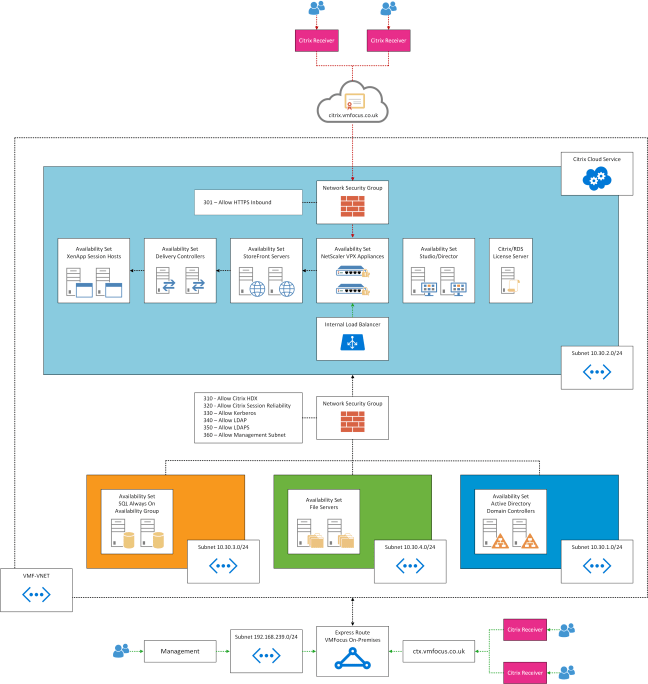
Azure NSG Diagram

Final Thought

Because we have only applied an ‘Inbound Network Security Group’ rule, this means that when users are within their Citrix session they have the ability to launch anything.  If you want to lock  down then an ‘Outbound Network Security Group’ rule would need to be created and applied.

Azure Site Recovery – How Do I Add Credentials?

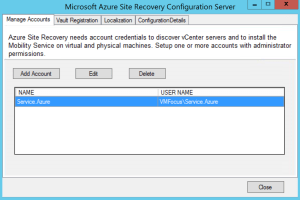
Azure Site Recovery uses two types of credentials, one for connecting to vCenter to discover virtual machines and the other for installing the Mobility Service into the virtual machines or physical servers you want to protect.

At the point of installation, you enter the credentials for both vCenter and the Mobility Service.  The question is how do you enter more credentials in the future?

The answer is to browse to your installation location E:Program Files (x86)Microsoft Azure Site Recoveryhomesvsystemsbin and launch cspconfigtool

ASR Add Credentials

This gives us the ability to add extra credentials

ASR Add Credentials 2

Final Thought

Azure Site Recovery is a work in progress and Microsoft have introduced some significant updates in the new version.  I would advise locating the cspconfigtool on your Windows desktop for future reference.

70-534: Architecting Microsoft Azure Solutions – Preparation & Exam Experience

Spec_Arch_AzureSol_logo_BWIt’s been a few years since my last Microsoft exam as my certification focus has been with other vendors.  During 2015, I started to see a shift in customers, as they became more comfortable with the public cloud, with many changing their requirements to a ‘cloud first’ approach.

With this in mind, I started to delve into Microsoft Azure and to understand the benefits it could offer.  At this point, Microsoft only offered the 70-533 Implementing Microsoft Azure Infrastructure Solutions exam.  I decided not to go for this initially as my day job is architecture rather than implementation, although on occasion I do get my hands dirty.

Towards the end of last year, Microsoft released the 70-534 Architecting Microsoft Azure Solutions certificate that measures the following skills:

  • Design Microsoft Azure infrastructure and networking
  • Secure resources
  • Design an application storage and data access strategy
  • Design an advanced application
  • Design websites
  • Design a management, monitoring and business continuity strategy

Preparation

When the exam was released, I made a decision to dust off my Microsoft certifications and get involved.  I started with the principles of Microsoft Azure and created a series of blog posts which cover the following:

Microsoft Azure Concepts – Availability Sets

Microsoft Azure Concepts – Backups

Microsoft Azure Concepts – Clusters

Microsoft Azure Concepts – Content Delivery Network

Microsoft Azure Concepts – Failures

Microsoft Azure Concepts – Identity & Access

Microsoft Azure Concepts – Media Services

Microsoft Azure Concepts – Networks

Microsoft Azure Concepts – Storage

Microsoft Azure Concepts – Virtual Machines

The purpose of these was to get my head around the IaaS parts of Azure and to understand the benefits in using each service area.  For example when would you use Active Directory Federation Services with Azure Active Directory rather than using Active Directory with Azure Active Directory Connect.

Once I understood these areas, I then focused on the exam objectives, which I knew would present the greatest challenge, which where:

  • Design an advanced application
  • Design websites
  • Design a management, monitoring and business continuity strategy

I purchased the book Architecting Microsoft Azure Solutions book by Haishi Bai, Steve Maier and Dan Stolts.  This is an excellent introduction to the exam objectives, but I felt it wasn’t enough to cover the areas I was weak on.

To compliment the book (which I read twice), Keith Mayer has created an excellent Exam Study Guide which I used to as an easy way to find the Azure documentation I was looking for.

Finally, I used three Pluralsight videos on Architecting Azure Solutions by Orin Thomas these really helped plug the gaps in the areas I wasn’t so familiar.

As well as reading and watching the training material, I also spent time using Azure.  I’m lucky enough to have a work sponsored Azure Subscription I can access to play around.  I strongly suggest you are familiar with Azure and also you understand the basics of PowerShell commands.

The Exam

I decided to take the Microsoft Online Proctored exam with Pearson Vue.  For some reason my Surface Book didn’t like the Pearson Vue application, so I used my daughters laptop.  I have to say that the security requirements where far higher than attending a Pearson Vue site, I literally had to empty my pockets and show the invigilator every part of the room I was sitting in twice.

A few things you should note about taking a proctored exam:

  • If you have an external monitor, they will make you turn it around
  • If you have a cup of coffee they will ask you to remove it from the room
  • They expect your desk to be completely clear, so no pen or paper for making notes

The exam itself was broken down into forty seven questions, which consisted of three case studies, each of which had at least six questions.  The rest of the questions where normal multiple choice or drag and drop.

The exam expects you to know the blueprint and the material contained within it.  You also need to be able to understand business requirements and map these to an Azure solution as well as the usual PowerShell commands.

Final Thought

I’m pleased to say I passed the 70-534 Architecting Microsoft Azure Solutions exam.  It was challenging due to the sheer breadth of information you have to understand, not only from a technical perspective, but when it would be best to use technology ‘a’ over ‘b’.

Overall, I would recommend the exam to anyone looking to develop their understanding of Microsoft Azure.