SRM: Reprotect Unsupported

When VMware Site Recovery Manager 5.0 was launched back September 2011 a new feature set was added to give you the ability to perform ‘automated re-protection’ and ‘automated failback’ using array based replication.

The release notes for Site Recovery Manager 5.0 describe this feature set in more detail.

  • Automated Re-Protection.
    • Re-protection is a new extension to recovery plans for use only with array-based replication. Automated re-protect enables the environment at the recovery site to establish replication and protection of the environment back to the original protected site through a single click.
  • Automated Failback
    • Automated failback returns the entire environment to the originally protected primary site. This can only happen after re-protection has ensured that data replication and synchronization have been established to the original primary site. Failback will run the same workflow that was used to migrate the environment to the protected site, ensuring that the critical systems encapsulated by the recovery plan are returned to their original environment. Automated failback, like re-protection, is only available for use with array-based replication protected virtual machines.
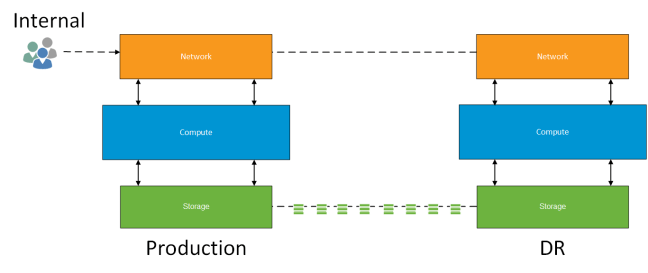
SRM Conceptual Diagram v0.1

Background

Since the release of SRM 5.0 I have performed a number of production installations using ‘array based replication’.  As part of the verification of the platform, the clients has requested the following functional tests be performed with ‘test virtual machines’

  1. Test Failover
    • Provide documented evidence that in a planned or unplanned event that the business should be able to recover within defined SLA’s.
  2. Planned Failover and Failback
    • Verify that an upcoming known event such as office refurbishment or other maintenance work a planned failover to the disaster recovery site and planned failback to the original protected site will work within SLA’s.
  3. Unplanned Failover and Failback
    • Verify that an unknown event such as a power outage or WAN failure that an unplanned failover to the disaster recovery site and a planned failback to the original protected site (once service had been restored) could be achieved within SLA’s.

All of the these tests have past with a number of minor issues which are resolved along the way.  That’s the point of the test right!

Reprotect Warning

During a recent installation of SRM using HP 3PAR StoreServ 7200 ‘a synchronous’ protection across two remote copy groups.  The first and second test passed without issue.  It was when we performed the ‘unplanned failover and failback’ that the issue arose.

Unplanned Failover Process

The first step is to sever the intersite link between protected and unprotected site.  Once complete you perform a Disaster Recovery Failover in SRM at the Recovery Site.  This leaves the following tasks unresolved which is shown in the screenshot below.

  • Pre-Synch Storage
    • Replicate recent changes
  • Shutdown VM’s at Protected Site
    • Ensure virtual machine data is consistent
  • Prepare Protected VMs for Migration
    • Create a final snapshot of the volume on which the protected VM’s reside
  • Synchronize Storage
    • Perform a final storage synchronisation to cover all changes

DC02 When DC01 Back Online

When you bring the original protected site back on line a ‘Recovery’ is required which performs the operations above which could not be completed.  In the screenshot below this has been completed successfully.

DC01 Recovery Performed AKA Planned Migration

This is the point now which a ‘Reprotect’ can be performed so that the original Protected site becomes the Recovery site.  At this moment we started to experience issues with the following failure notification:

Failed to reverse replication for failed devices.   Cause: A storage operation on unknown consistency group ‘PG01’

A call was logged with HP and VMware as the SRM logged showed that it was a storage provider fault and that the reverse replication command could not issued.

2015-01-27T11:01:50.894Z [01664 error ‘Recovery’ ctxID=69310807 opID=bbdef04] Plan execution (reprotect workflow) failed; plan id: recovery-plan-1234, plan name: RP01, error: (dr.storageProvider.fault.StorageReverseReplicationFailed) {

–>    dynamicType = <unset>,

–>    faultCause = (dr.storage.fault.UnknownDeviceGroup) {

–>       dynamicType = <unset>,

–>       faultCause = (vmodl.MethodFault) null,

–>       id = “RP01”,

–>       msg = “”,

–>    },

–>    msg = “”,

–> }

This is when things got interesting and in my opinion VMware decided to hide behind some rather ambiguous text.

Ambiguous Text

The text below is taken from the VMware Site Recovery Manager 5.8 Documentation Center

‘If you performed a disaster recovery operation, you must perform a planned migration when both sites are running again. If errors occur during the attempted planned migration, you must resolve the errors and rerun the planned migration until it succeeds’

How do you perform a planned migration if you have performed a disaster recovery option? There is no option for this only ‘Recovery’ what do they actually mean?  Well the next paragraph states the following:

Reprotect is not available under certain conditions:

  • Recovery plans cannot finish without errors. For reprotect to be available, all steps of the recovery plan must finish successfully.
  • You cannot restore the original site, for example if a physical catastrophe destroys the original site. To unpair and recreate the pairing of protected and recovery sites, both sites must be available. If you cannot restore the original protected site, you must reinstall Site Recovery Manager on the protected and recovery sites.

So in our case all steps of the ‘Recovery’ operation had finished and we expected to be able to failback, considering that the same documentation under Reprotect Virtual Machines After a Recovery states:

‘After a recovery, the recovery site becomes the new protected site, but it is not protected yet. If the original protected site is operational, you can reverse the direction of protection to use the original protected site as a new recovery site to protect the new protected site.

Manually reestablishing protection in the opposite direction by recreating all protection groups and recovery plans is time consuming and prone to errors. Site Recovery Manager provides the reprotect function, which is an automated way to reverse protection.’

VMware Support Statement

After numerous backward and forward exchanges.  VMware’s answer was that in the event of an unplanned failover to perform a supported reprotect you must meet the following conditions:

  • Delete your Recovery Plans
  • Delete your Protection Groups
  • Manually reverse replication on your storage
  • Re-create your Protection Groups
  • Re-create your Recovery Plans

Really VMware?

Final Thoughts

SRM is mature intelligent product that understands when a Disaster Recovery failover has been performed.

  • Why then do we have the options for ‘Recovery’ and ‘Reprotect’ if these are not supported in this scenario?
  • Why does SRM documentation not clearly state what is and isn’t supported?
  • Why is SRM not able to cope with this scenario?  Surely it should be supported.

This was new to me and my use cases for SRM have now reduced.  One of the key components of the product is to remove manual administration to mitigate risk of human errors.

The positives are that with this new found knowledge I will be looking at alternative products as such Zerto to meet customer requirements.
vROPs Foundation – The Case of the Missing Edition

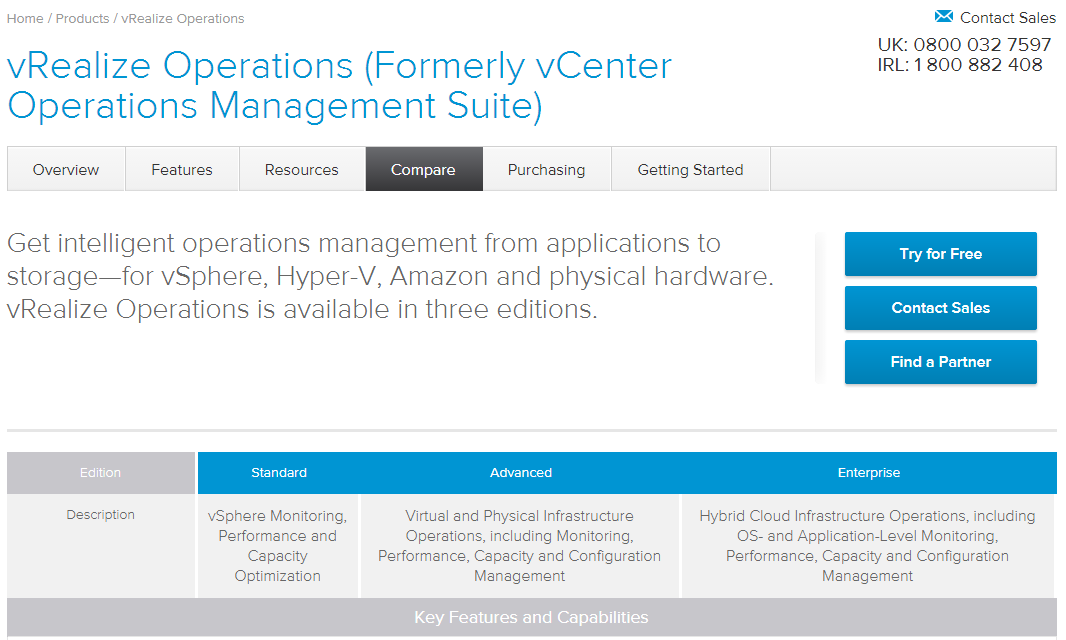
It appears that in the newest release of vRealize Operations Manager the Foundation version has been discontinued.

Screenshot taken from VMware United Kingdom vRealize Operations Manager edition comparison.

vROPs

What Does This Mean?

My experience with vRealize Operations Manager predecessor vCenter Operations Manager was that it required data collection for at least 60 days for you to leverage anything meaningful from it.

This meant you could run the foundation version initially which would collect all the relevant performance data required and then use your free trial key after 60 days to open up the features required.

This approach was great for PoC’s or pilots as it didn’t require any initial investment from the business.  My concern is that only being able to leverage the product for 60 days, customers might not 100% believe the information that vROPs is reporting.

Screenshot taken from VMware United States vRealize Operations Manager evaluation center

vROPs 60 Day

I have raised this internally with VMware in the United Kingdom to see if a ‘Foundation’ version of vROPs is in the pipeline.

Credit goes to Neil Gardner all round top bloke and one of my colleagues who brought this to my attention.

How To: Map HP StoreVirtual Volumes to Datastores

Problem Statement

You have created numerous datastores on your HP StoreVirtual of the same size and presented these to your ESXi Hosts.  However, you have since forgotten how the datastores map back to the volumes.

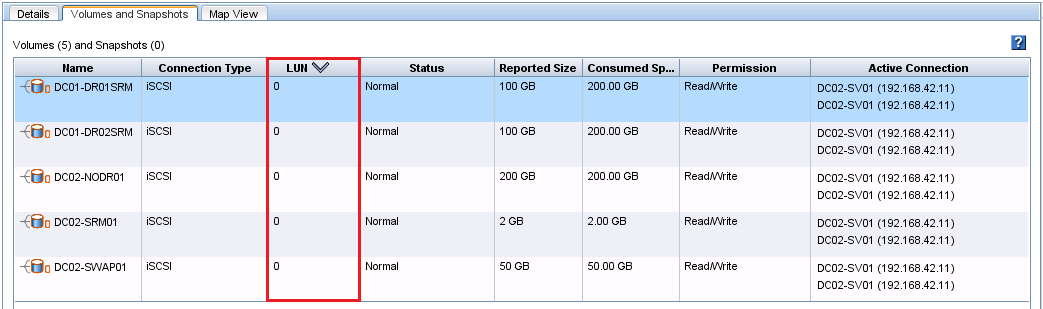
When you check the Runtime Name of your devices (Storage > Devices) to find out the LUN number, you see that each LUN has is ‘0’ as per the screenshot below.

LUN 0

This can be confirmed in HP StoreVirtual Centralised Management Console under Servers > Select Server > Volumes & Snapshots

LUN 0 HP SV

Not very helpful at all!

Resolution

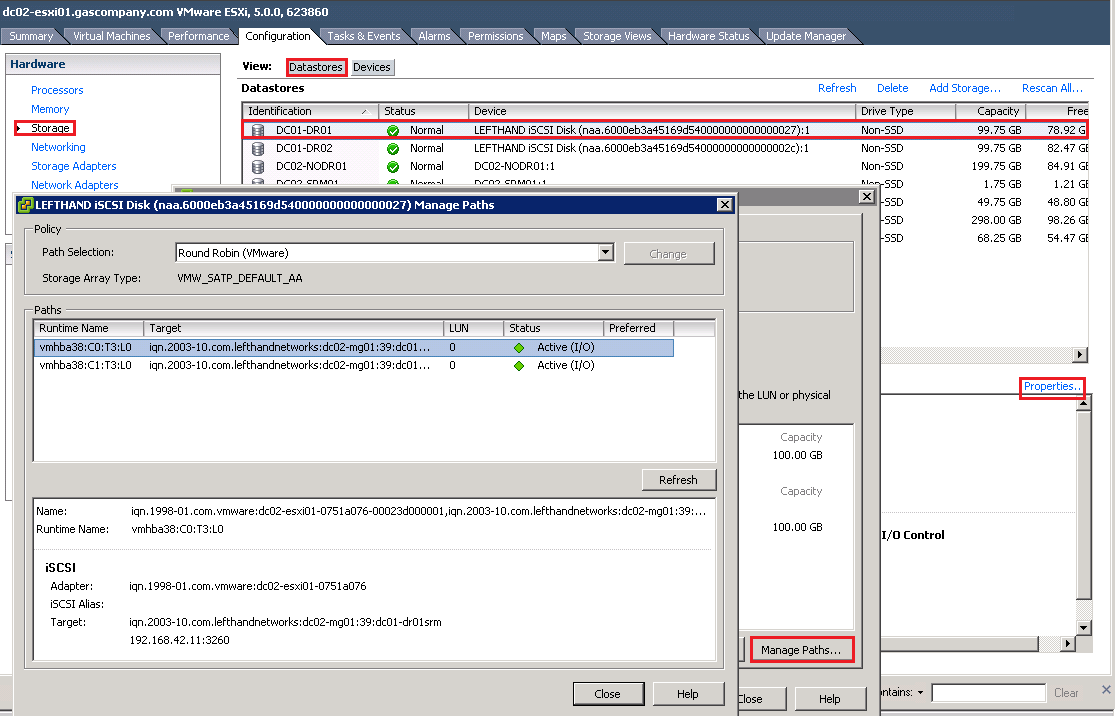
Each datastores has a unique iSCSI Target string which can be used to identify how they are mapped to volumes.

To find out what they are select the Datastore > Properties > Manage Paths

Device Properties

At the bottom we can see the Target, this shows tells us the following details:

  • DC02-MG01
    • Denotes the Management Group the volume is in
  • 39 is the hexadecimal representation of 27 which is the VMware NAA (thanks to Jonathan Reid for this information)
    • Denotes the unique target identifier for the volume
  • DC01-DR01SRM
    • Denotes the volume name on the HP StoreVitual

Target Name

So we now know this datastore corresponds to the volume called DC01-DR01SRM in Management Group DC02-MG01.

VCDX Defense Schedule 2015

A quick post to mention that the VCDX  defense schedule has been released for 2015.

Defenses will be held simultaneously at Palo Alto (USA), Frimley (UK) and Singapore (Asia)

For more details of how to register for the defense or to see if more dates become available, I suggest you book mark this VMware Community page and follow Karl Childs @karlchilds on Twitter.

Pre-Sales v Post-Sales

Versus-ModeThis is a post that I have been meaning to do for a while now, infact since last year! It follows on from the topic I started in a previous blog post, ‘What’s in a Job Title‘ and also ‘What’s This Pre-Sales Thing All About?

So the question is who is better?  To answer this, I will go over a number of categories that are used during a customer engagement to determine the winner.

I will be using the following two job titles, one each for pre and post sales.

Solutions Architect – Assist sales people across a broad range of products and are subject matter experts in a particular field.  They help translate business needs into technical solutions.  Commonly Solutions Architect guide the customer to use a particular piece of software or technology to meet the business requirement.  Some Solutions Architects can Lead Architect a project if required.

Technical Architect – Are focused in a particular discipline and are often the subject matter experts in this area.  These are the people who are engaged to create the ‘low level designs’ in there area of expertise, such as networking, storage, Exchange, Active Directory, System Center, Windows Desktop, vSphere, View etc.

Disclaimer: This is from my experience in which pre-sales and post-sales roles are clearly separated.  Your own experience will naturally differ depending on the size of the environment you work in and your own skill set.

1. Initial Customer Engagement

This is when the sales person engages a consultant to understand the business requirements and then translate them into a technical proposal.

The consultant will most likely be pre-sales.  They will qualify the opportunity to determine if this is something that the company they work for should spend their time on.  Ultimately, even though the pre-sales person is seen as a ‘cost of sales’ they take on the responsibility of what opportunities to pursue.

Responsibility: Pre-Sales 10 Post-Sales 0

Overall Score: Pre-Sales 10 Post-Sales 0

2. Customer Meeting

The opportunity is qualified and a meeting is held which is attended by the pre-sales person.  The purpose of this is to understand the business requirements of the technical solution in terms of Availability, Manageability, Performance, Recoverability and Security.  Also they gather details on the existing environment along with any issues that the customer is experiencing.

At this stage, a number of factors come into play and I’m afraid these are all pre-sales.

  • Understand whom you need to engage with at the customer as what IT want isn’t always what the business needs!
  • Rapport building with the customer, I know it sounds corny, but they have to believe in your ability to deliver the goods/services you represent.
  • Soft skills, are you able to listen and put across your point to C level and or technical people?
  • Can you understand exactly what the business issue is and what the customer is asking you to solve?

Responsibility: Pre-Sales 10 Post-Sales 0

Overall Score: Pre-Sales 20 Post-Sales 0

3. Technical Proposal

The creation of a proposal to match the requirements gathered in the customer meeting.  This document dictates the hardware, software and professional services effort that will be used to deliver the solution.

The pre-sales person is responsible for putting together the proposal ensuring that everything is interoperable and supported in the proposed configuration.

The proposal should be validated by multiple post-sales individuals to ratify the proposed solution and confirm the professional services effort (normally ends up in a tug of war with post-sales wanting more and the sales person wanting less.  With pre-sales being the referee!).

The solution is then presented to the customer, usually by the pre-sales person.

Responsibility: Pre-Sales 8 Post-Sales 2

Overall Score: Pre-Sales 28 Post-Sales 2

4.  Customer Workshop

Depending on the size of the project which has been won will determine the number of workshops that will be held with the customer.  The initial workshop is usually to determine the ‘project definition’ and is attended by the Project Manager, Solution Architect, Technical Architects and customer.

The Solution Architect takes the lead and covers items such as whom the customer is, what they are trying to achieve, the overall vision for the solution detailing Availability, Manageability, Performance, Recoverability and Security requirements along with existing infrastructure.  It’s important to note that the post-sales people who reviewed the proposal are not usually the same ones in the workshops.

The Technical Architects will then lead their own workshops based around their subject area such as network, storage, anti virus, backups etc.

Responsibility: Pre-Sales 5 Post-Sales 5

Overall Score: Pre-Sales 33 Post-Sales 7

5. Low Level Designs

Each Technical Architect will create a low level design for the area that they are responsible for.  The document will include every aspect of the implementation such as firmware versions, diagrams and test plans.  They will also confirm exact requirements for the bill of materials.

The Solutions Architect generally reviews these documents to ensure that they are in the same format, the customer is referred to in the same name, the overall requirements are met and that any mistakes are rectified before customer release.

Responsibility: Pre-Sales 2 Post-Sales 8

Overall Score: Pre-Sales 35 Post-Sales 15

6. Implementation

This really is the realms of post-sales, who install and configure the solution and test it with the customer for sign off.

Not much more to say, apart from either it does what it is suppose to or it doesn’t!

Responsibility: Pre-Sales 0 Post-Sales 10

Overall Score: Pre-Sales 35 Post-Sales 25

7. Technical Ability

Expectations should be that post-sales technical skill set should be higher than pre-sales, although pre-sales will often have the same level certification with a vendor.  Pre-sales often lack the implementation experience, meaning that even though they could perform the installation and configuration it would take them a couple of days longer compared to their post-sales comrades.

Ability: Pre-Sales 4 Post-Sales 6

Overall Score: Pre-Sales 39 Post-Sales 31

8. Hidden Ability

I wasn’t entirely sure what to call this section, but these are the hidden things such as appearance, timekeeping, getting back to people, being able to word an email without offending the recipient and communicating to a customer when they are wrong without calling them a plonker!

This part is very subjective.  It is my personal experience, that pre-sales dominate in this area.  Not to say that post-sales are not good, they just seem to be far between.  Overall I have encountered far more post-sales people who are awesome technically, but you would only wheel them out in front of the customer when the deal is done.

Ability: Pre-Sales 7 Post-Sales 3

Overall Score: Pre-Sales 46 Post-Sales 34

Final Word

So the winner is pre-sales, why is that?

Pre-sales are the key to obtaining, winning and keeping customers.  Without pre-sales we wouldn’t need post-sales.  However if we take this full circle the actual winner is sales as without them we don’t have a requirement for pre or post sales.

Have your say, who do you think are better?