Microsoft Azure Concepts – Mobile Apps

Mobile Apps are a recent phenomenon in Microsoft Azure and form part of App Services, which are specifically targeted at the delivery applications on mobile technology.

What Are Mobile Apps

In a nutshell, Mobile Apps are a PaaS offering, which means that the developer can create and manage mobile applications without needing to worry about managing and maintaining the underlying operating system.

Depending on the App Service Plan chosen, will entitle you to a number of features for your website which are:

  • Amount of disk space
  • SLA
  • Number of instances
  • Auto Scale
  • Backups
  • Geo Distributed Deployment
  • Custom Domain
  • Staging Environment
  • Offline Sync
  • Active Mobile Devices

Most businesses would choose the Standard Tier as this provides an SLA of 99.95% along with Auto-Scale.  More information on the types of App Service plans can be found here.

As part of the Mobile Apps PaaS offering identity and access are included as this is underpinned via Azure Active Directory.  Meaning that if you use Azure AD Connect in either same sign on or single sign on you have the ability to provide enterprise level authentication using your on-premises directory services.  Or if the mobile application is going to be standaline, the ability to use social providers such as Facebook, Google or Twitter is provided.

Offline Data

Mobile coverage is an issue in the UK, I can be driving on the M1 and in some areas have no phone signal.  This is a challenge when developing mobile applications as you can’t expect the user to always be in an area that has excellent coverage.  Built into Mobile Apps is an offline sync client which uses SQL Lite to cache and modify data locally on the end device.  It works on a push basis with the end device providing the notification to Mobile Apps to receive data over REST API’s.

Offline sync is available on Andiod, Cordova, iOS, Windows.

Notification Hubs

Integrated with Mobile Apps are Azure Notification Hubs.  These allow you to send notifications to mobile devices using a Platform Notification System (PNS).  In the same way that offline sync is available across platforms, so are notifications hubs.

Typical use cases for Azure Notification Hubs are:

  • Breaking news or offers
  • Updates per location e.g. travel issues
  • Updates per group e.g. people with a similar interest
  • One time passwords for MFA

Upload Content

Mobile apps by their very nature usually require input from the client device.  This could be in the form of uploading documents or images to Azure Blob storage.  To achieve this you would use a Shared Access Signature (SAS), the client device calls the Mobile App to generate a SAS which passes a storage token back to the client device enabling the user to write data to your Azure Blob storage account on a time restricted basis.

The diagram below provides a logical overview of the use of mobile apps and how the components integrate.

mobile-apps-v0-1


Microsoft Azure – UK Datacentres

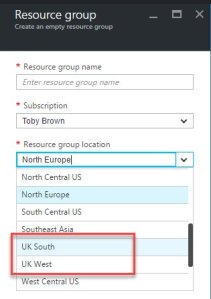
azureMicrosoft have made Azure and Office 365 generally available from UK datacentres in London, Durham and Cardiff.

The go live of these services means that customers who had concerns regarding data sovereignty and compliance, now have some of their concerns alleviated.

It is important to understand that some services are not available from UK datacentres yet, these include:

  • Storage Import and Export which could be a factor if you want to seed data
  • Azure Site Recovery, meaning that you cannot protect your Azure based VM’s across regions using this service

A full list of services available in the Europe are located here.

Thanks to @sideshowtob for the Resource Group picture below.

uk-datacentres


Azure App Service Migration Assistant Tool

App ServiceOne of my colleagues brought the Azure App Service Migration Assistant Tool to my attention recently.

App Services are used to provide PaaS type offerings with Microsoft controlling items such as deployment slots, load balancing, backups and operating system patches, with the consumer focusing on the IIS instance.

App Services are quite appealing to customers as it allows them to pass over the infrastructure elements to Microsoft enabling them to deal with managing and maintaining their websites.

So the question is, how do I know if my website is ready to become a Microsoft Azure App Service?  This is where the Azure App Service Migration Assistant Tool comes into play.  It scans the IIS server and determines readiness for migration to Microsoft Azure including:

  • Websites running on the IIS server.
  • Applications and virtual directories configured under each site.
  • Application pools used by the sites and applications and their settings.
  • HTTP and HTTPS bindings used by the sites.
  • Databases defined in web.config using connectionString attribute.

Azure Quick Tip – New Cloud Service No Virtual Network or Subnets

Problem Statement

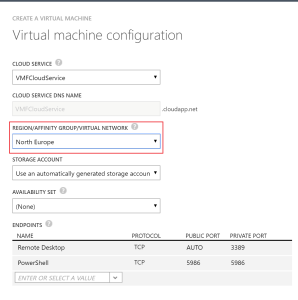
A new Cloud Service is deployed, but when you create a Virtual Machine your VNET and subnets are not available.

VM Configuration No Subnet

Resolution

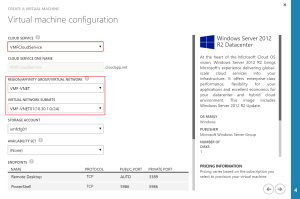
After creating the Cloud Service, refresh your Azure Classic Portal and then create the Virtual Machine.  You will then have access to the VNETs and subnets within your region.

VM Configuration No Subnet 02


Presenting at Technology User Group – London on 5th May

LogoThis is going to be my first time attending the Technology User Group event in London on 5th May at Grange St Paul´s Hotel, 10 Godliman Street, EC4V 5AJ.

For those of you who don’t know, TechUG is a independent community of IT Professionals spread around 8 cities in the UK & Ireland. Focused on technology areas such as Virtualisation, Cloud, Storage, Data Centre, Open Source and DevOps, communities are run locally by a group of volunteer committee members and supported by a central team. TechUG runs free community events twice yearly in each city and also collaborate with other user groups.

For the London gathering on 5th May, the event team, have lined up a great group of presenters, including Chris Kranz, who will bring his insights on AWS and it’s use cases apart from IaaS. Also Peter von Oven, author of Mastering VMware Horizon 6 who will be sheep dipping us in the key areas of a desktop transformation project.

I’m also lucky enough to be presenting and if you are their from the kick off, you can hear my dulcet tones covering the topic ‘What’s Azure Site Recovery All About?’ which will provide a look at Microsoft’s DR platform.  In this session I will cover the challenges around traditional disaster recovery and Microsoft’s answer to these challenges.

If you haven’t already I suggest you register to attend over here.