Azure Network Watcher

This is a guest blog post by one of my Cisco CCIE colleagues Adam Stuart on his view of Azure Network Watcher.

What is it?

Azure Network Watcher is a feature within Microsoft Azure to make consumption of network data/troubleshooting easier.

How much does it cost?

Free until August 1st.

Then

  • 5GB free network logs p/m, with small overcharge for extra GB
  • 1000 checks p/m, small overcharge per extra 1000 checks

Plus storage costs for log retention.

What Does It Do?

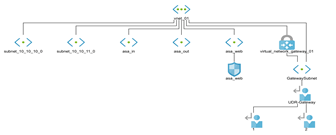
  • Monitoring Topology – Shows a very basic network topology diagram, no further drill down is possible.  To exactly useful but better than nothing.

Topology v0.1

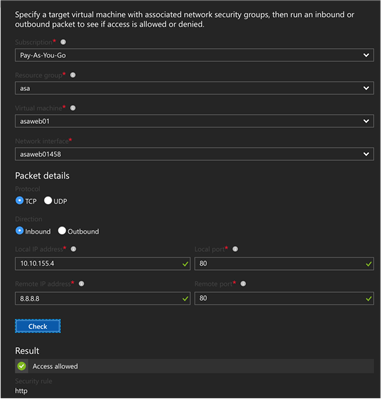
  • Diagnostics – IP Flow Verify, simple packet trace function to test is a source/destination is allowed via a NSG policy.  Equivalent of packet trace in Cisco land.  Quite useful if you have lots of NSG.  Overall a good sanity check.

IP Flow Verify

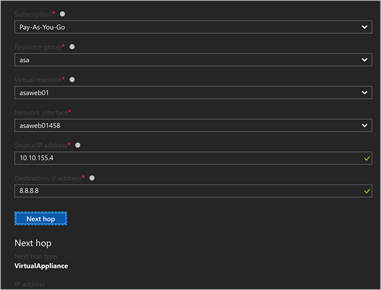
  • Diagnostics – Next Hop, simple utility to verify next hop as per effective routing table.  This would be useful for a customer using Network Virtual Appliance (NVA) Firewalls and complex UDR.  It provides insight into the Azure routing service which is otherwise tricky to obtain.

Next Hop

  • Diagnostics – Provides details of NVA specific to network interface of VM.  Not useful unless you have overlapping NSG on a NIC and subnet and wanted to see the result of an aggregate policy
  • Diagnostics – Packet Capture, this is essentially an easier way to run tcpdump and get pcap files form virtual machines. Note, you need to install a VM extension* to get this to work see here.
  • Logs – NSG Flow Logs, the equivalent of checking Access-list log on a normal firewall. This is the primary function that most customer will be after. To answer the question “is the firewall blocking it”? Enabled on a per NSG basis, logs to a container in blob storage, which you export as JSON format.  This is probably quite powerful, but the default output is not very accessible. JSON format logs require another parser to provide any real value.

Azure Updates – Summary of 2017 Enhancements

azureWhen you shift your focus from on-premises architecture to cloud based services, you notice that the velocity of updates and new features is relentless.  To give you an idea, over the last 12 months Microsoft have released over 500 updates on the Azure platform, some of these are feature enhancements, betas, public previews and new services.

Microsoft Azure is a moving target keeping up to date with enhancements is a full time job!

With this in mind, I thought I would share with you , the feature enhancements over the past few months that have had the biggest impact to the customers I work with.

Azure DevTest Labs – Ability to set an expiry date on virtual machines

We all know that development environments should only be up and running for a short amount of time to facilitate an application enhancement or initiative.  However in reality the virtual machines which were only meant to be temporary, end up being on all the time with everyone afraid to power them off ‘just in case something bad happens’.

With Azure DevTest Labs we can now harness the inbuilt functionality to set expiry dates to virtual machines.  Sounds trivial but what a great feature addition to manage the compute resources around a VM lifecycle.

Read more here.

Azure Automation – Start/Stop VMs (Preview)

We are used to having our on-premises VMs running 24×7.   Because we have already invested in the compute and storage infrastructure so what is the real use case of shutting them down?  Instead we sweat our assets for the three to five year hardware lifecycle and rinse and repeat.`

Taking the same architecture principles to a cloud based platform increases costs.  Why not get smart and reduce your consumption costs by targeting applications to when users access them?  If HR only work Mon-Fri 9-5 and access Sage during this time frame, then why not power on the VM at 8am and shut it down at 6pm?  Reducing your Azure consumption costs by 58% over a 12 month period.

Read more here.

Azure Managed Disks

When running virtual machines in Azure it’s not just a simple case of creating a storage account, factors such as the number of virtual machines per storage account with their IOPS requirements as well as the impact that backups have need to be taken into consideration.

These manual considerations can be negated to a point using Azure Managed Disks in which Azure handles the Storage Account in the back end reducing your management overhead.

With the general availability release of Azure Managed Disks integrate with Azure Backup and also Disk Encryption.

Read more here.

Automated Backup for SQL Server 2014 and 2016 Virtual Machines

It can be common for enterprises to backup SQL Server databases outside of the general backup schedule applied to other applications.  With the release of Automated Backup for SQL Server 2014 and 2016 Virtual Machines this can be automated for you with the creation of the VM.

With a daily backup and a retention period of 30 days, this adds another layer of protection to your backup routine.

Read more here and here.

Azure Backup Instant File Recovery (Preview)

Azure Backup has always done a job, but backing up a VM level has had its disadvantages namely having to restore an entire VM to an alternate location to get back a single file or folder.

Azure Backup Instant File Recovery creates a writable mount point attached to the VM you want to restore data too using an iSCSI target.  This simplifies the process and reduces management overhead.

Read more here.

Azure Security Center Enhancements (Preview)

The Azure Cyber Security  team have announced a number of the new enhancements which are in preview.  The most poignant ones are:

  • Application White Listing – Allow only the authorised executables to run within the virtual machine, with Azure Security Center discovering and recommending white listing policies
  • Just in Time Network Access to VM’s – Reduce your attack surface by only allowing access to common ports when required

By simply deploying the above two changes, I can see a benefit for most organisations to enhance their security footprint.

Read more here.

Microsoft Azure Concepts – Operations Management Suite

omsWhen deploying workloads to the public cloud, the question arises ‘how do you monitor them’?  This then leads to further questions such as:

  • Will my existing monitoring solution support Microsoft Azure workloads such as PaaS?
  • Do I need to purchase extra licenses or upgrade my existing licenses?
  • Do I need to have two different monitoring solutions? One for on-premises and one for the public cloud?

Each of the above questions then leads to a myriad of further questions around the deployment mechanism, how data is collected, stored and displayed.  How are you altered of issues or potential issues?  How do you capacity plan for resources in the cloud?  How do you monitoring specific application workloads?

To answer these questions and more Microsoft released Operations Management Suite which became generally available in January 2016.

What is Operations Management Suite?

Operations Management Suite is ‘Management as a Service’ or MaaS for short.  It runs in Microsoft Azure and can provide visibility into your on-premises and Microsoft Azure based workloads, providing a consistent monitoring approach across datacentres.

OMS is broken down into four key components which at a high level are:

  • Insight and Analytics to collect, correlate, search and act on log and performance data generated by operating systems and applications. Providing real time analysis of information and potential issues.
  • Automation & Control which enables a consistent approach to control and appliance by leveraging desired state configuration, change tracking and update management.
  • Security and Compliance focuses on identifying, assessing and mitigate risks to infrastructure. Collecting and analysing security events to identify suspicious activity.
  • Protection and Recovery to provide analysis and status updates of Azure Backup and Azure Site Recovery

The diagram below depicts a logical overview of the proposed Operations Management Suite environment.

azure-oms-logical-v0-1

Note: At the time of writing OMS supports Azure Backup and Site Recovery in Classic Mode.

Operations Management Suite Components

The components of Operations Management Suite are broken down into three areas, agent, dashboard and solution packs.

  • Agent is an in-guest service which can be pushed out automatically using Group Policy, System Center Configuration Manager or another deployment method. It is used to provide heartbeats and data back to the centralised Operations Management data repository
  • Dashboard is the Operations Management Suite portal which runs in a browser. The dashboard can be customised with graphical views of valuable searches and solutions
  • Solution Packs are add-on services which add functionality and provide in-depth analysis of collected data. Examples of commonly deployed Solution Packs are:
    • Malware Assessment which provides status of antivirus and antimalware scans across servers
    • Change tracking with tracks configuration changes across servers
    • System Update Assessment which identifies missing system updates across servers
    • AD Replication Status which identifies Active Directory replication issues
    • SQL Assessment which assesses the risk and health of SQL Server environments
    • AD Assessment which asses the risk and health of Active Directory environment

Microsoft are continuously updating Solution Packs and a few which are in public preview are listed below:

  • Azure Networking Analytics which enables you to gain insight into Network Security Groups and Application Gateway logs
  • Capacity and Performance which enables you to view Hyper-V CPU, memory and storage utilisation
  • Office 365 which provides visibility into user activities as well as forensics for audit and compliance purposes
  • Network Performance Monitoring which offers real time monitoring of parameters such as loss and latency
  • System Centre Operations Manager Assessment which asses the risk of your SCOM environment
  • VMWare Monitoring provides the ability to explore ESXi Host logs for monitoring, deep analysis and trending

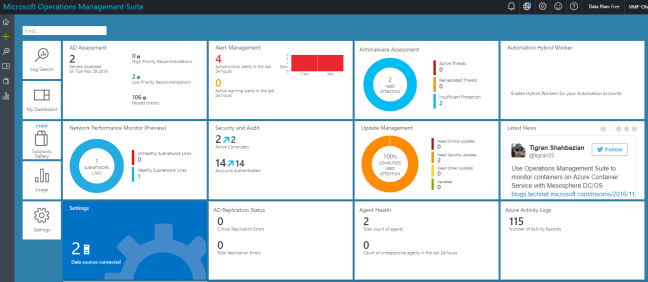
The graphic below provides an example Operations Management Suite dashboard.

oms-dashboard

Workspaces

OMS uses the concept of workspaces which is primarily an administrative boundary but is also used to collect data within an Azure region.  Workspaces can be used to delegate responsibility to individual users or groups who undertake specific roles e.g. Network Team access to Network Performance Monitor.

It should be noted that workspaces are independent of each other and that data collected from each workspace cannot be viewed in another workspace.  However you can link multiple workspaces to a single Microsoft Azure subscription.

Workspaces also enable the use of different license plans, for example in one workspace you might use the System Center Add On and another workspace you might use Insight & Analytics.

Data Collection

Operations Management Suite collects data on a real time basis using either in-guest agents installed on Windows or Linux, a System Center Operations Management Group which uses the SCOM management servers to forward events and performance data to Log Analytics or finally an Azure Storage Account that collects data from PaaS and IaaS services.

  • Logging which is data generated by the operating system or application such as event logs, IIS logs, syslogs or custom logs in the form of text files.
  • Performance which uses the Windows or Linux performance counters to collect data such as memory, processor and disk information
  • Solution specific items which provide in-depth analysis of application items

A logical overview of data collection is shown below.

azure-oms-data-collection-v0-1

Licensing

OMS can be licensed either on a pay as you go basis or on a subscription basis.  You are given the choice of licensing all OMS components together as a ‘suite’ which makes the overall cost cheaper or you can pick which components you need.

  • Licenses are based on nodes, a node is defined as a physical computer, virtual machine or network device
  • Node charges are hourly and nodes that only report for a part of a month are proratared
  • Each node can produce up to 500MB of data per day without incurring any extra charges
  • OMS data retention is currently set to one month, plans to expand this to two years are in the pipeline

Final Thought

OMS is maturing as a product and integration points to on-premises environment is evolving.  The ability to provide a centralised dashboard with application or vendor specific solution packs will make the product more appealing.  Watch this space!

Cheap(er) Microsoft Azure Exams

azure-skillPart of working in IT means keeping your skills relevant and up to date, which usually leads into taking exams on a regular basis.  Depending on your situation, exams maybe self or employer funded, so when a vendor has a certification offer, it’s worth taking note.

The usual cost of a Microsoft Azure exam with Pearson Vue is £135.60 inc. VAT (in the United Kingdom see Designing and Implementing Cloud Data Platform Solutions.

Later last year Microsoft launched ‘Advance your Azure skills‘ in a bid to get more individuals certified on their public cloud platform.  Using this URL will give access to the same exams but for £96.20 inc. VAT with a number of additional benefits which are:

  • Practice test for 30 days
  • One free retake
  • Access to Microsoft online Azure course catalogue

So what are you waiting for?  Now is the time to start cracking on with your Microsoft Azure exams!

70-533: Implementing Microsoft Azure Infrastructure Solutions – Prep & Exam Experience

mcsa-cloudplatform-logo-blkspec_impl_azure_infrasol_bwReaders of this blog know that my focus has shifted towards hybrid cloud and the architecture to enable customers to consume Microsoft Azure for varying requirements.

Having passed 70-534: Architecting Microsoft Azure back in March 2016, I had been putting off the  70-533 Implementing Microsoft Azure
Infrastructure Solutions
 due to the sheer volume of Azure work I was undertaking with customers which didn’t leave much time for studying.  Anyhow, I thought it was about time I sat the 70-533 exam which covers:

  • Implement Web Apps
  • Implement Virtual Machines
  • Implement Cloud Services
  • Implement Storage
  • Implement Azure Active Directory
  • Implement Virtual Networks

Preparation

I went back over my previous blog posts on the following topics to make sure I was up to speed on the basics again.

Microsoft Azure Concepts – Availability Sets

Microsoft Azure Concepts – Backups

Microsoft Azure Concepts – Clusters

Microsoft Azure Concepts – Content Delivery Network

Microsoft Azure Concepts – Failures

Microsoft Azure Concepts – Identity & Access

Microsoft Azure Concepts – Media Services

Microsoft Azure Concepts – Mobile Apps

Microsoft Azure Concepts – Networks

Microsoft Azure Concepts – Network Security Groups

Microsoft Azure Concepts – SQL Data Warehouse

Microsoft Azure Concepts – Storage

Microsoft Azure Concepts – Virtual Machines

After I gotten my head around these again, I decided it was time to focus on the exam objectives that would present the greatest challenge which was performing tasks in PowerShell.

The difficulty was that the exam covers both the Azure Classic Deployment and Azure Resource Manager, so I found myself doubling up on commands.

ProTip: Like me, if you are not a PowerShell guru, then I suggest you use PowerShell ISE as it’s far more intuitive than just a command prompt!

I purchased the book Implementing Microsoft Azure Infrastructure Solutions by Michael Washam and Rick Rainey.  This is an excellent introduction to the exam, but I wasn’t convinced it would be enough to see me through the exam.

To compliment the book, I watched a number of Pluralsight videos on Implementing Microsoft Azure Infrastructure Solutions by Tim Warner which really helped plug any gaps I had.

As well as reading and watching the training material, I also spent time using Azure.  I’m lucky enough to have a work sponsored Azure Subscription I can access to play around.  I strongly suggest you are familiar with Azure and also you understand the basics of PowerShell commands.

The Exam

I decided to take the Microsoft Online Proctored exam with Pearson Vue.  I have to say that the security requirements where far higher than attending a Pearson Vue site, I literally had to empty my pockets and show the invigilator every part of the room I was sitting in twice.

A few things you should note about taking a proctored exam:

  • If you have an external monitor, they will make you turn it around
  • If you have a cup of coffee they will ask you to remove it from the room
  • They expect your desk to be completely clear, so no pen or paper for making notes

The exam itself was broken down into forty eight individual questions consisting of your usual multiple choice or drag and drop.

The exam expects you to know the blueprint and the material contained within it.  You also need to be able to understand when and why you would make technical decisions for example:

When would you choose yo use Point-to -Site over a Site-to-Site VPN.

Final Thought

I’m pleased to say I passed the 70-533 Exam.  It was challenging due as I don’t spend all my time implementing Azure solutions (especially on the PowerShell front).  In fact a lot of my time is spent researching new Azure features for customers to see if they stand up from a technical and commercial perspective.

Overall, I would recommend the exam to anyone looking to develop their understanding of Microsoft Azure.

It appears that when you pass both the 70-533 and 70-534 exam you become certified a MCSA: Cloud Platform.  So my advice, is pick up the books and crack on with some studying, things are moving to the cloud whether we like it or not!