Azure Site Recovery – How Do I Add Credentials?

Azure Site Recovery uses two types of credentials, one for connecting to vCenter to discover virtual machines and the other for installing the Mobility Service into the virtual machines or physical servers you want to protect.

At the point of installation, you enter the credentials for both vCenter and the Mobility Service.  The question is how do you enter more credentials in the future?

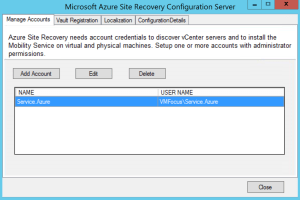
The answer is to browse to your installation location E:Program Files (x86)Microsoft Azure Site Recoveryhomesvsystemsbin and launch cspconfigtool

ASR Add Credentials

This gives us the ability to add extra credentials

ASR Add Credentials 2

Final Thought

Azure Site Recovery is a work in progress and Microsoft have introduced some significant updates in the new version.  I would advise locating the cspconfigtool on your Windows desktop for future reference.

70-534: Architecting Microsoft Azure Solutions – Preparation & Exam Experience

Spec_Arch_AzureSol_logo_BWIt’s been a few years since my last Microsoft exam as my certification focus has been with other vendors.  During 2015, I started to see a shift in customers, as they became more comfortable with the public cloud, with many changing their requirements to a ‘cloud first’ approach.

With this in mind, I started to delve into Microsoft Azure and to understand the benefits it could offer.  At this point, Microsoft only offered the 70-533 Implementing Microsoft Azure Infrastructure Solutions exam.  I decided not to go for this initially as my day job is architecture rather than implementation, although on occasion I do get my hands dirty.

Towards the end of last year, Microsoft released the 70-534 Architecting Microsoft Azure Solutions certificate that measures the following skills:

  • Design Microsoft Azure infrastructure and networking
  • Secure resources
  • Design an application storage and data access strategy
  • Design an advanced application
  • Design websites
  • Design a management, monitoring and business continuity strategy

Preparation

When the exam was released, I made a decision to dust off my Microsoft certifications and get involved.  I started with the principles of Microsoft Azure and created a series of blog posts which cover the following:

Microsoft Azure Concepts – Availability Sets

Microsoft Azure Concepts – Backups

Microsoft Azure Concepts – Clusters

Microsoft Azure Concepts – Content Delivery Network

Microsoft Azure Concepts – Failures

Microsoft Azure Concepts – Identity & Access

Microsoft Azure Concepts – Media Services

Microsoft Azure Concepts – Networks

Microsoft Azure Concepts – Storage

Microsoft Azure Concepts – Virtual Machines

The purpose of these was to get my head around the IaaS parts of Azure and to understand the benefits in using each service area.  For example when would you use Active Directory Federation Services with Azure Active Directory rather than using Active Directory with Azure Active Directory Connect.

Once I understood these areas, I then focused on the exam objectives, which I knew would present the greatest challenge, which where:

  • Design an advanced application
  • Design websites
  • Design a management, monitoring and business continuity strategy

I purchased the book Architecting Microsoft Azure Solutions book by Haishi Bai, Steve Maier and Dan Stolts.  This is an excellent introduction to the exam objectives, but I felt it wasn’t enough to cover the areas I was weak on.

To compliment the book (which I read twice), Keith Mayer has created an excellent Exam Study Guide which I used to as an easy way to find the Azure documentation I was looking for.

Finally, I used three Pluralsight videos on Architecting Azure Solutions by Orin Thomas these really helped plug the gaps in the areas I wasn’t so familiar.

As well as reading and watching the training material, I also spent time using Azure.  I’m lucky enough to have a work sponsored Azure Subscription I can access to play around.  I strongly suggest you are familiar with Azure and also you understand the basics of PowerShell commands.

The Exam

I decided to take the Microsoft Online Proctored exam with Pearson Vue.  For some reason my Surface Book didn’t like the Pearson Vue application, so I used my daughters laptop.  I have to say that the security requirements where far higher than attending a Pearson Vue site, I literally had to empty my pockets and show the invigilator every part of the room I was sitting in twice.

A few things you should note about taking a proctored exam:

  • If you have an external monitor, they will make you turn it around
  • If you have a cup of coffee they will ask you to remove it from the room
  • They expect your desk to be completely clear, so no pen or paper for making notes

The exam itself was broken down into forty seven questions, which consisted of three case studies, each of which had at least six questions.  The rest of the questions where normal multiple choice or drag and drop.

The exam expects you to know the blueprint and the material contained within it.  You also need to be able to understand business requirements and map these to an Azure solution as well as the usual PowerShell commands.

Final Thought

I’m pleased to say I passed the 70-534 Architecting Microsoft Azure Solutions exam.  It was challenging due to the sheer breadth of information you have to understand, not only from a technical perspective, but when it would be best to use technology ‘a’ over ‘b’.

Overall, I would recommend the exam to anyone looking to develop their understanding of Microsoft Azure.

Microsoft Azure Concepts – Media Services

When I think about Media Services, automatically the complexity of delivering content springs to mind.  How do I get the footage from my location to a website securely? How do I then deliver the footage so that it can be consumed?  How do I make the footage available offline? How do I make sure the footage is only available for a set period of time?

Well if you are famous then you probably have a team of people who worry about this for you.  For us common folk, we have to rely upon a third party service.  This is where Azure Media Services can help.

What Is Azure Media Services

According to Microsoft, Azure Media Services enables developers to create a scalable media management and delivery platform.  What this really means is it allows you to provide live streaming or on demand access to audio and/or video content in a secure manner.

What Makes Up Azure Media Services?

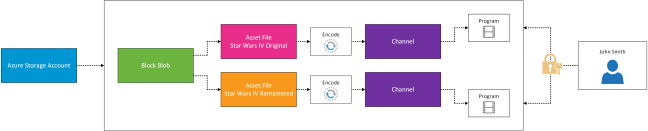
The first thing you need is an ‘asset’.  Think of an ‘asset’ as a container that holds all of the files that make up your movie.  The ‘asset’ is then mapped to a blob container.  Each ‘asset’ must contain a unique version of the media content.  For example if you have Star Wars IV and Star Wars IV Remastered these need to be in separate ‘assets’.

Next we have an ‘asset file’ which is a digital media file stored on the blob container which is associated with you ‘asset’.  Each ‘asset’ can be encrypted using one of the following options:

Option Encryption
None No Encryption
Storage Encrypted Encrypted locally using AES 256. Stored in Azure on encrypted storage
Common Encryption Protected Encrypt content with Common Encryption or PlayReady DRM
Envelope Encryption Protected Encrypt HTTP live streaming (HLS) with Advanced Encryption Standard (AES)

An asset policy is then applied to the ‘asset’ to determine permissions to the resources and the duration of the access, for example you might want to allow everyone to view a live stream of an event.  But then you might want people to register to download the event for offline viewing.

It’s important to note that the blob storage container is the boundary for access to the ‘asset’.  To access the media content, locators are used which are essentially entry points.  These can be either on demand for streaming or SAS (shared access signature) URL based.

  • Bandwidth is purchased in 200Mbps increments
  • Default of two streaming endpoints per Media Service account

Before media content is stored in Azure, you might want to encode it.  This process is known as a ‘job’, each ‘job’ contains a number of tasks which are performed.  For example, you might want to to encode a video so that it is compatible with common web players and mobile devices.

Last of all we have channels, the best way to think of these are like channels on TV.  Each Media Service account comes with five channels.  Within each channel is a program.  Think of these are a timed even on a channel.  You can have three concurrent programs running on your five channels at any given point in time.

Probably a bit easier to explain the above in a diagram, so here it is.

Azure Media Services

Microsoft Azure Concepts – Content Delivery Network

Everyone wants a good experience accessing a websites content from any where at any time.  Whether we like it or not location comes into play, if I’m trying to stream content from Australia and I’m located in the United Kingdom, you can expect to receive circa 250ms latency, which means a poor user experience.

Microsoft have the answer which is Content Delivery Networks (CDN).  Essentially this is a global caching solutions that delivers the website content from a point of presence closest to the users.

Caching Content

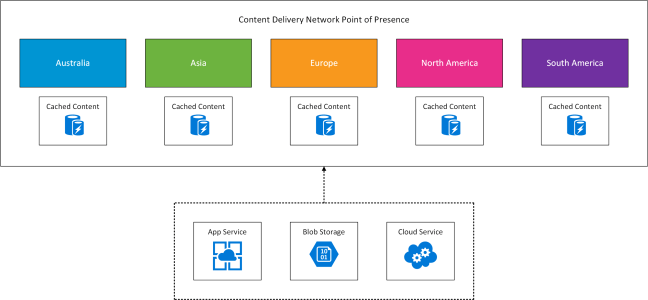
When CDN is enabled you will create an endpoint.  An endpoint is the URL used to access your cached resources for example http://endpoint.azureedge.net.  Each CDN supports up to ten endpoints, which holds one of three types of cached content.

Blob Storage – If your Blob Storage is publicly available then it can be made accessible via CDN

App Services – If you are running App Services then you can again make these available via CDN

Cloud Services – If you are running Cloud Services then you can again make these available via CDN

What Locations Are Used

CDN has a point of presence (POP) in the following locations.

Australia Asia Europe North America South America
Melbourne

Sydney

Batam

Hong Kong

Jakarta

Kaohsiung

Osaka

Seoul

Singapore

Tokyo

Bangalore

Chennai

Delhi

Mumbai

Amsterdam

Copenhagen

Frankfurt

Helsinki

London

Madrid

Milan

Paris

Stockholm

Vienna

Warsaw

Atlanta

Chicago

Dallas

Philadelphia

Los Angeles

Miami

New York

San Jose

Seattle

Washington DC

Boston

São Paulo

Quito


This is shown in the conceptual diagram below.

Azure CDN

Microsoft Azure Concepts – Clusters

Following on from the post Microsoft Azure Concepts – Failures, I thought it would be worthwhile creating a quick post on Azure Clusters.

  • Each Azure Cluster is made up of 20 racks
  • Within each rack is between 40 and 50 servers
  • Each server within the Azure Cluster contains the same processor generation
  • Virtual Machines within an ‘Affinity Group’ are held within the same Azure Cluster to minimise latency

Fabric Controller

  • Each rack is a fault domain
    • Each rack has a ‘top of rack’ (ToR) switch which is a single point of failure
    • Each ToR connects to the aggregation layer switch which connects all the of racks in the Azure Cluster
    • Each rack has a power distribution unit which again is a single point of failure