When VMware Site Recovery Manager 5.0 was launched back September 2011 a new feature set was added to give you the ability to perform ‘automated re-protection’ and ‘automated failback’ using array based replication.
The release notes for Site Recovery Manager 5.0 describe this feature set in more detail.
- Automated Re-Protection.
- Re-protection is a new extension to recovery plans for use only with array-based replication. Automated re-protect enables the environment at the recovery site to establish replication and protection of the environment back to the original protected site through a single click.
- Automated Failback
- Automated failback returns the entire environment to the originally protected primary site. This can only happen after re-protection has ensured that data replication and synchronization have been established to the original primary site. Failback will run the same workflow that was used to migrate the environment to the protected site, ensuring that the critical systems encapsulated by the recovery plan are returned to their original environment. Automated failback, like re-protection, is only available for use with array-based replication protected virtual machines.
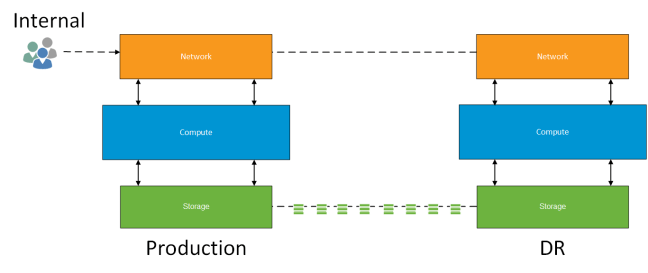
Background
Since the release of SRM 5.0 I have performed a number of production installations using ‘array based replication’. As part of the verification of the platform, the clients has requested the following functional tests be performed with ‘test virtual machines’
- Test Failover
- Provide documented evidence that in a planned or unplanned event that the business should be able to recover within defined SLA’s.
- Planned Failover and Failback
- Verify that an upcoming known event such as office refurbishment or other maintenance work a planned failover to the disaster recovery site and planned failback to the original protected site will work within SLA’s.
- Unplanned Failover and Failback
- Verify that an unknown event such as a power outage or WAN failure that an unplanned failover to the disaster recovery site and a planned failback to the original protected site (once service had been restored) could be achieved within SLA’s.
All of the these tests have past with a number of minor issues which are resolved along the way. That’s the point of the test right!
Reprotect Warning
During a recent installation of SRM using HP 3PAR StoreServ 7200 ‘a synchronous’ protection across two remote copy groups. The first and second test passed without issue. It was when we performed the ‘unplanned failover and failback’ that the issue arose.
Unplanned Failover Process
The first step is to sever the intersite link between protected and unprotected site. Once complete you perform a Disaster Recovery Failover in SRM at the Recovery Site. This leaves the following tasks unresolved which is shown in the screenshot below.
- Pre-Synch Storage
- Shutdown VM’s at Protected Site
- Ensure virtual machine data is consistent
- Prepare Protected VMs for Migration
- Create a final snapshot of the volume on which the protected VM’s reside
- Synchronize Storage
- Perform a final storage synchronisation to cover all changes

When you bring the original protected site back on line a ‘Recovery’ is required which performs the operations above which could not be completed. In the screenshot below this has been completed successfully.

This is the point now which a ‘Reprotect’ can be performed so that the original Protected site becomes the Recovery site. At this moment we started to experience issues with the following failure notification:
Failed to reverse replication for failed devices. Cause: A storage operation on unknown consistency group ‘PG01’
A call was logged with HP and VMware as the SRM logged showed that it was a storage provider fault and that the reverse replication command could not issued.
2015-01-27T11:01:50.894Z [01664 error ‘Recovery’ ctxID=69310807 opID=bbdef04] Plan execution (reprotect workflow) failed; plan id: recovery-plan-1234, plan name: RP01, error: (dr.storageProvider.fault.StorageReverseReplicationFailed) {
–> dynamicType = <unset>,
–> faultCause = (dr.storage.fault.UnknownDeviceGroup) {
–> dynamicType = <unset>,
–> faultCause = (vmodl.MethodFault) null,
–> id = “RP01”,
–> msg = “”,
–> },
–> msg = “”,
–> }
This is when things got interesting and in my opinion VMware decided to hide behind some rather ambiguous text.
Ambiguous Text
The text below is taken from the VMware Site Recovery Manager 5.8 Documentation Center
‘If you performed a disaster recovery operation, you must perform a planned migration when both sites are running again. If errors occur during the attempted planned migration, you must resolve the errors and rerun the planned migration until it succeeds’
How do you perform a planned migration if you have performed a disaster recovery option? There is no option for this only ‘Recovery’ what do they actually mean? Well the next paragraph states the following:
Reprotect is not available under certain conditions:
- Recovery plans cannot finish without errors. For reprotect to be available, all steps of the recovery plan must finish successfully.
- You cannot restore the original site, for example if a physical catastrophe destroys the original site. To unpair and recreate the pairing of protected and recovery sites, both sites must be available. If you cannot restore the original protected site, you must reinstall Site Recovery Manager on the protected and recovery sites.
So in our case all steps of the ‘Recovery’ operation had finished and we expected to be able to failback, considering that the same documentation under Reprotect Virtual Machines After a Recovery states:
‘After a recovery, the recovery site becomes the new protected site, but it is not protected yet. If the original protected site is operational, you can reverse the direction of protection to use the original protected site as a new recovery site to protect the new protected site.
Manually reestablishing protection in the opposite direction by recreating all protection groups and recovery plans is time consuming and prone to errors. Site Recovery Manager provides the reprotect function, which is an automated way to reverse protection.’
VMware Support Statement
After numerous backward and forward exchanges. VMware’s answer was that in the event of an unplanned failover to perform a supported reprotect you must meet the following conditions:
- Delete your Recovery Plans
- Delete your Protection Groups
- Manually reverse replication on your storage
- Re-create your Protection Groups
- Re-create your Recovery Plans
Really VMware?
Final Thoughts
SRM is mature intelligent product that understands when a Disaster Recovery failover has been performed.
- Why then do we have the options for ‘Recovery’ and ‘Reprotect’ if these are not supported in this scenario?
- Why does SRM documentation not clearly state what is and isn’t supported?
- Why is SRM not able to cope with this scenario? Surely it should be supported.
This was new to me and my use cases for SRM have now reduced. One of the key components of the product is to remove manual administration to mitigate risk of human errors.
The positives are that with this new found knowledge I will be looking at alternative products as such Zerto to meet customer requirements.


 The vExpert 2015 Announcement has been made by VMware and I’m pleased be to say that I have been nominated for the third year.





 VMFocus