2014 – It’s A Wrap

2014 was a rollercoaster ride of a journey with tremendous highs and terrible lows.  One of the things I focused on during 2014 was to be ‘more’ concise.  With that in mind, this is what happened in ‘my 2014’.

Blog

  • Posted 34 blog posts
  • VMFocus received just over 375,000 visitors
  • VMFocus enters vSphere Lands Top 50 Bloggers list at number 42
  • Passed 200 overall blog posts (this being 206)
  • Entered my third year of blogging
  • Didn’t post in November 2014
    • First time I haven’t blogged in a month since VMFocus’s inception in May 2012

Community

Education

Fitness

  • Body Fat 8%
    • Achieved and maintained throughout 2014
  • Metabolic Age 22
  • Basal Metabolic Rate 1907 kcal

Lessons Learnt: HP StoreVirtual P4500 10 GbE Upgrade & Virtual Connect

Purpose

The purpose of this blog post is to give you an insight into some of the quirky behaviour that I experienced during an upgrade of HP infrastructure, specifically in relation to HP StoreVitual 4500 and Virtual Connect.

Background

Existing HP infrastructure exists across a campus which has recently been upgraded to redundant 10Gbps links.

Site A contains:

  • 2 x HP Lefthand P4500 (before upgrade to LeftHand OS 11.5)
  • 1 x C7000 Blade Chassis with HP BL460c G7 blades

Site B contains:

  • 2 x HP Lefthand P4500 (before upgrade to LeftHand OS 11.5)
  • 1 x C3000 Blade Chassis with HP BL460c G6 blades
    • C3000 Blade Chassis to be disposed off

Site C contains:

  • HP FailoverManager for Lefthand

The underlying hypervisor is vSphere 4.1 which is to be upgraded once the hardware is in situ.

Design

The design was quite straight forward, to meet the customer requirements, we needed to:

  • Provide a 10 Gbps Core network using redundant HP5820 in am IRF stack
  • Introduce a vSphere Metro Storage Cluster on vSphere 5.5 U1
    • Ability to run workloads at either location
    • Provide operational simplicity
  • Introduce an additional C7000 Blade Chassis
  • Introduce HP BL460c Gen8 Blades for new
  • Introduce a performance tier for StoreVirtual using 4335
  • Introduce an archive tier for StoreVirtual using 4530
  • Upgrade existing P4500 to 10GbE

A logical overview of the solution is shown below.

Blog Post

Pre-Requisites

As part of the pre-requisite work the HP firmware had been upgraded as follows:

All new components had been upgraded to the same firmware and software levels.

Upgrade Purpose

The purpose of upgrade was to introduce/change the following items before vSphere was upgraded to 5.5 U1

  • HP 5820 Core
    • Change configuration to enable ESXi 4.1 Port Groups to be responsible for VLAN tagging
  • P4500 10GbE Cards
    • Existing 1GbE Cards to be used for iSCSi Management
    • New 10GbE Cards to be used for iSCSI Storage Traffic
  • Virtual Connect
    • Change configuration to enable ESXi 4.1 Port Groups to be responsible for VLAN tagging
  • vSphere
    • Update Port Groups so that ESXi is responsible for adding VLAN Headers

Lessons Learnt – Virtual Connect

On the new C7000 Chassis with HP BL460c Gen 8 Blades, Virtual Connect was used to logically separate bandwidth for four different networks with each containing traffic for a single subnet.  A VLAN tag was assigned to each subnet allowing ESXi 4.1 to be apply the VLAN headers.

From the ESXi DCUI we were unable to ping from VMkernel Management network to the HP5820 which was acting as the default gateway.  However placing a laptop into an ‘access port’ on the same VMkernel Management VLAN we could ping the default gateway on the  HP5820.

After some troubleshooting we found that the issue was with Virtual Connect, if you define a network as a ‘single network’ with a VLAN tag assigned to it, Virtual Connect very kindly removes the VLAN header.

Resolution: Select Multiple Networks rather than a Single Network

The next issue we came across was Virtual Connect on the existing C7000 with HP BL460c G7 Blades.  Virtual Connect would accept the changes to Shared Uplink Set and Server Profiles so that we were now using ‘Multiple Networks’ with VLAN tag’s however we couldn’t ping the default gateway on the HP5820 from the ESXi DCUI.

Again, after some troubleshooting we discovered that Virtual Connect allows you to make changes to existing networks from ‘Single’ to ‘Multiple Networks’ with the HP BL460c G7 Blades running, but these changes don’t take effect until after a reboot.

Resolution: After any Virtual Connect change reboot blade

 Lessons Learnt – HP P4500

When you upgrade the HP P4500 to 10GbE you add an additional 4GB RAM and the 10GbE card, fairly straight forward.  After the hardware installation we wanted to utilise the network cards as follows:

  • 2 x 10GbE in an Adaptive Load Balance bond for iSCSI Storage Traffic
  • 1 x 1GbE for iSCSI Management Traffic

To do this we need to break the existing Adaptive Load Balance bond on the 1GbE connections.  After breaking the bond we had no link lights on the HP5820 or P4500.  We started to scratch our heads and jumped on the KVM to see what had happened.  We soon discovered that when the bond is broken, the network interfaces are placed into ‘disabled’ state.

Resolution: Maintain KVM or iLO access when breaking an ALB bond

Next we placed an IP Address on the 1GbE interface so that we could continue to manage the array.  We enabled flow control on the 10GbE interfaces and also jumbo frames as this was part of the design and then finally created the ALB bond with the 10GbE interfaces having the default gateway applied to them.  We ran some simple ping tests to the Management IP Address which resulted in a ping response, however the 10GbE would not respond.  Not exactly where we wanted to be!

We broke the ALB bond on the 10GbE and we could ping the 1GbE interface and 10GbE interfaces.  This then lead to the discovery that you cannot use the 1GbE interfaces with 10GbE interfaces on the same subnet.  We didn’t have time to test the 1GbE interfaces on a different subnet to see if this configuration would work.

Resolution: Disable the 1GbE interfaces

Now we had 10GbE interfaces working using Adaptive Load Balacing, it was time to ensure that flow control was enabled.  We saw some very strange results either it was on some interfaces and off others!  A quick check of the HP5820 and flow control was enabled on the correct ports.  We carried out a number of test but still couldn’t get flow control to show as enabled:

  • Broke the ALB bod to manually enabled flow control
  • Shut down the HP5820 interfaces and enabled them
  • Restarted the HP P4500

We found the resolution by mistake.  On one of the nodes we performed a shutdown then power on rather than a restart, flow control was enabled.  It appears that it is only on the power on operation the P4500 negotiate flow control settings with the upstream switch.

Resolution: After enabling flow control, shutdown and power on P4500

New: HP 3PAR StoreServ File Persona

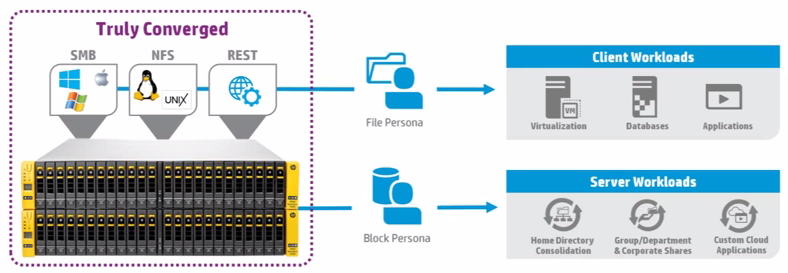
For me, this is one of the best announcements at HP Discover, 3PAR StoreServ entering the world of ‘file’ level storage natively, removing the requirement for a StoreEasy gateway.

File Storage


Features

HP have confirmed that the following key features will work with ‘file’ level storage:

  • Thin Provisioning
  • Zero Detect
  • Adaptive and Dynamic Optimization
  • Adaptive Flash Cash (for reads)
  • Synchronous & Asynchronous replication via Remote Copy
  • Symantec & McAfee Anti Virus integration
  • Data at Rest Encryption*

*Note this is an optional license

3PAR Dashboard

Within the 3PAR Dashboard is a section called ‘File Persona’ which will enable the management of file shares, virtual file servers and persona configuration.

File Persona

Support

The following features will be supported at the initial release:

  • SMB 1.0, 2.0 and 3.0
  • NFSv3 and v4
  • Active Directory, LDAP and local user Authentication
  • DFS Namespace including Microsoft MMC support

Licence

To use ‘file’ level storage an extra license is required.  More on this to come when updates are released.

Arrays

To support ‘file persona’ the array needs to have extra cache, these come from the ‘C’ type models.  This essentially means that you need to swop out your existing controllers or purchase a new array.

More information on the ‘C’ arrays can be found over at Patrick Terlisten’s blog vCloudnine.de

New: HP 3PAR StoreServ Management Console ‘SSMC’

Those of you who have used the 3PAR Inform Management Console know that it wasn’t exactly the best, screen refreshes taking a while, being logged out of StoreServ’s with the connection still showing as open.

HP have decided to give the 3PAR Inform Management Console a ‘facelift’, step forward HP’s new 3PAR StoreServ Management Console AKA ‘SSMC’.

What’s New

  • New dashboard with the same look and feel as OneView
  • Management of file and block from same interface
  • Inbuilt System Reporter
  • Web based
  • Smart Search across all objects

So what does it look like? Well below are a couple of screenshots to wet your appetite.

3PAR Dashboard

3PAR Dashboard

 3PAR SmartSearch

3PAR SmartSearch

HP is moving towards a similar management experience for storage, servers and networking.  Something in my opinion has been long overdue.

Compatibility

SSMC will be compatible with 3PAR Inform OS 3.1.3 or above.

License

No licenses are required this will be a free download

Supported Operating Systems

SSMC will be available as a Windows based install on Windows Server 2008 R2, 2012 or 2012 R2.  It will also be available in certain flavours of Linux.

Final Thoughts

Over the long term I expect that the SSMC will be integrated into the VSP for 3PAR as this will give HP the ability to control software updates to the SSMC in a controlled fashion.

The Service Processor (SPOCK) is still a separate entity again, I expect this will be integrated further as the dot releases become available.

What’s In A Job Title?

Job TitleWhilst at VMworld Barcelona I had lots of conversations with colleagues, peers and strangers.  One item that cropped up was ‘pre-sales’ versus ‘post-sales’ and who was better.  Quite an interesting topic, which I want to discuss on an upcoming blog post.  Before that happens I wanted to cover job titles in IT, and what they generically mean that a person does.

In this context I’m focusing on the personnel involved with winning and delivering a project, not IT support and ‘business as usual’ operations.

Before anyone gets a bit upset about what they do specifically, this is meant to be a broad stroke blog post.  You will always find some businesses that call a job by another name.  Let me know if you don’t agree with my interpretation and I will update the post accordingly.

Pre Sales Job Titles

Bid Manager – Bring together a group of subject matter experts to write a tender response.  Play ‘tetris’ with words and make sure the tender response is coherent and flows.

Enterprise Architect – Works with clients to formulate a technical business strategy.  Often deeply engaged in business process and understands the internal politics of a customer.

Systems Engineers – Assist Sales people across a broad range of products and help guide clients up to a degree before handing in depth questions to subject matter experts

Senior System Engineers – Sames as System Engineers but normally focus on the ‘key client accounts’

Solutions Architect – Assist Sales people across a broad range of products and are subject matter experts in a particular field.  They help translate business needs into technical solutions.  Commonly Solutions Architect guide the customer to use a particular piece of software or technology to meet the business requirement.  Some Solutions Architects can Lead Architect a project if required.

Note Solutions Architects is fairly new in the infrastructure world, commonly used with computer programming.

Technical Account Manager – Typically a technical person who has become less technical (through choice) but has the ability to create a proposal for a customer which will form a sound basis for further discussion.

Post Sales Job Titles

Project Manager – Focused on deliverables and governance.  Ensuring customers are kept abreast of issues and risks that could affect the project outcomes.

Programme Manager – Are used on larger projects that have inter dependencies between workstreams and involve business transformation projects such as Enterprise Resource Planing solutions.  Responsible for ensuring that the business benefits of the programme are realised.

Technical Architect – Are focused in a particular discipline and are often the subject matter experts in this area.  These are the people who are engaged to create the ‘low level designs’ in there area of expertise, such as networking, storage, Exchange, Active Directory, System Center, Windows Desktop, vSphere, View etc.

Lead Architect – Are used on larger projects that use a wide number of Technical Architects.  Understand how everything ‘fits together’ and use this knowledge to ensure that design documentation is consistent from Technical Architects.  Plus they are responsible for guiding the Technical Architects for the duration of the project.