Relay vCenter Alert Emails Externally

I was fortunate enough to have a second post published on the VMware SMB Blog site.  This particular post is an issue that I faced quite a while back, but it still holds true if you are trying to relay vCenter alerts externally.

From the Bloggers Bench: Relay vCenter Alert Emails Externally

When configuring your vCenter environment, most if not all VMware Administrators will set up email alerting. I covered the configuration of this in Setting Up & configuring Alarms In vCenter Part 1.

Unfortunately, if you leave Exchange 2010 using its Default Receive Connector, you will only receive alerts internally e.g. to the domains which Exchange 2010 is authoritative. This causes a problem if you need to send alerts to a third party e.g. Managed Service Provider.

To demonstrate the issue, I have connected to a vCenter server and then I’m going to telnet to an Exchange 2010 CAS Server on port 25 by issuing the command:

telnet VMF-EX01 25

Once in enter the following:

EHLO
MAIL FROM: vmware@testdomain.co.uk
<Press Enter>
RCPT TO: craig@vmfocus.com
<Press Enter>

Read more over at the VMware SMB Blog

Time To Get Involved – HP Accredited Solutions Expert

I had intended to take a break from studying after recently passing the VCP5-DT.  Yesterday, I received an email from HP mentioning that I could update my HP APC – StorageWorks Solutions Architect 2011 to HP ASE – Storage Solutions Architect, needless to say that email which normally I would have filed in ‘deleted items’ had me intrigued.

First of all I checked the certification overview which states

“This certification validates that you are able to identify and translate business requirements into an enterprise, multi-site storage solution design that supports all needed applications and data. This includes data across physical, virtual and cloud environments with a common architecture and converged management considerations. Your skills to design deduplication and back-up/recovery solutions for information protection and storage solutions for information retention and analytics with massive “big data” repositories will be validated. This includes validation of your expertise to design and architect storage solutions that enable seamless efficiency, agility, information protection, and non-disruptive scalability for optimum ROI.”

Some fancier words that I would tend to normally use, however it does fit the very essence of what I do.

The ideal candidate

“IT professionals with at least one year of experience in storage technologies are ideal candidates. If you want the proven credibility to not only identify and define business requirements but to also design enterprise, multi-site complex storage solutions to meet those needs, this certification is ideal for you.”

Again, I fit the bill, there must be a catch somewhere I thought, maybe it’s four exams and you need to go on a paid course?

Looking into this, it appears that you only need to sit and pass the HP0-J66 HP Storage Migration exam.  Earning this certification confirms you can:

  • Understand the hardware configuration and architecture of the new HP 3PAR StoreServ platform
  • Identify the components and the specifications of the new HP 3PAR StoreServ platform
  • Describe changes in the Service Processor on the HP 3PAR StoreServ OS 3.1.2
  • Explain how to use the HP 3PAR StoreServ Virtual Service Processor
  • Describe how to use the HP 3PAR StoreServ SmartStart setup tool
  • Describe the new features of the StoreVirtual SAN/iQ Operating System environment
  • Identify changes to the CMC to integrate FC connection type similar to iSCSI
  • Identify and describe the OneCommand Manager and San Toolbox HBA And SAN Tools used to
  • Configure the StoreVirtual fiber channel platforms
  • Understand the hardware configuration and architecture of the new StoreVirtual servers
  • Identify the components and the specifications of the new StoreVirtual servers

The exam must be fairly recent as StoreServ was only released late November 2012, same for StoreVirtual (LeftHand’s new name).

I plan to use the material below for the exam.  This is all web based training and is free from HP Learning Center

  • HP 3PAR Inform OS 3.1.2 Delta Rev 13.11
  • HP 3PAR 7000 Array Hardware Delta, Rev. 13.11
  • HP StoreOnce B6000 Backup System Training Rev 13.11
  • LeftHand SAN/iQ 10.1 L2 Training Rev 13.11
  • LeftHand Nitro A L2 Training Rev 13.11

Got To Be In It To Win It

Virtualised

Being new to the blogging world, I didn’t realize that there was such a thing as ‘Top VMware & Virtualization Blogs’ until I saw a raft of tweets about registering for it towards the end of 2012.

I for one, enjoy healthy competition and decided to get involved by registering vmfocus.com  I would like to thank Eric Sierbert for putting together the poll together as it must take a lot of personal time to put the structure together and collate all the data.

So why did I decide to blog? Well, for two reasons, the first being I love using VMware product range and I’m constantly ‘banging’ on about it on a daily basis with colleagues and clients.  The second and perhaps the most important to me, is documenting issues I face and also to help as a study aid.

I was surprised to see a few folks getting upset on Twitter about the reason why people blog.  For me, if someone takes the time out of there day to put something down on the big ‘www’ which can help me achieve a task, understand a product or troubleshoot an issue that’s got to be  a good thing, regardless of there motivation.

So if you have a spare five minutes head over to vsphere-land.com to cast your vote.

Performance Increase? Changing Software iSCSI Adapter Queue Depth

I had an interesting point raised on the blog today from Colin over at Solori.net He suggested changing the IOPS=QUE_DEPTH to see if I can decrease my storage latency.  I wasn’t able to find any settings to alter the queue depth on HP StoreVirtual and I’m not fortunate enough to have a Fiber channel SAN kicking around, so I don’t have the ability to change an HBA setting.  However this got the grey matter whirring , what about changing the Software iSCSI Queue Depth in ESXi5.1?

Before we get into the testing, I think it’s an idea to go over how a block of data gets from a VM to the hard disks on your NAS/SAN.

  1. Application e.g. Word Document
  2. Guest VM SCSI queue
  3. VMKernel
  4. ESXi vSwitch
  5. Physical NIC
  6. Physical Network Cable
  7. iSCSI Switch Server Port
  8. iSCSI Switch Processor
  9. iSCSI Switch SAN Port
  10. Physical Network Cable
  11. iSCSI SAN Port
  12. iSCSI Controller

I actually feel sorry for the blocks of data, they must be knackered by the time they are committed to disk.

At the moment I’m sending 1 IOP down each iSCSI path to my HP StoreVirtual VSA.  The results of this was an increase in overall IOPS performance, but an increase in latency see blog post Performance Increase? Changing Default IOP Limit

The Software iSCSI Queue Depth can be verified by going into ESXTOP and pressing U (LUN)

SSDVOL02 is naa.6000eb38c25eb740000000000000006f which has a Disk Queue Depth of 128

Disk Queue Length

IOMeter will let us know the overall latency which is what the Guest OS sees, which is great, but what we care about is knowing where the latency is happening.  This could be in one of three places:

  1. Guest VM SCSI queue
  2. VMKernel
  3. Storage Device

I have spun up a Windows 7 test VM, which has 2 vCPU and 2GB RAM.  Again for consistency I’m going to use the parameters set out by http://vmktree.org/iometer/

The Windows 7 test VM is the only VM on a single RAID 0 SSD Datastore.  It is also the only VM on the ESXi Host.  So we shouldn’t expect any latency due to compute resources being in constraint.

We are going to use ESXTOP to measure our statistics using d (disk adapter) u (LUN) and v (VM HDD) and collate these with the IOMeter results.

The focus is going to be on DAVG/cmd KAVG/cmd and QAVG/cmd these are related to

DAVG/cmd  is Storage Device latency.

KAVG/cmd is VMKernel Device latency

GAVG/cmd is the total of DAG/cmd and KAVG/cmd

QAVG/cmd is Queue Depth of our iSCSI Software Adapter

Storage DEPTH

Taken from Interpreting ESXTOP Statistics

‘DAVG is a good indicator of performance of the backend storage. If IO latencies are suspected to be causing performance problems, DAVG should be examined. Compare IO latencies with corresponding data from the storage array. If they are close, check the array for misconfiguration or faults. If not, compare DAVG with corresponding data from points in between the array and the ESX Server, e.g., FC switches. If this intermediate data also matches DAVG values, it is likely that the storage is under-configured for the application. Adding disk spindles or changing the RAID level may help in such cases.’

Our Software iSCSI Adapter is vmhba37

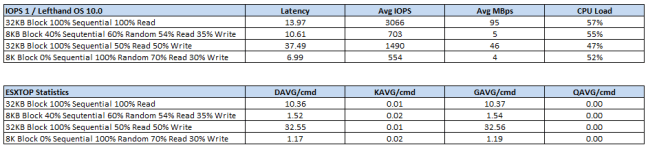
Note that for the ESXTOP statistics, I took these at 100 seconds into each IOMeter run.

Default 128 Queue Depth

128 Queue Depth Results

Right then let’s make some changes shall we.

I’m going to run the command esxcfg-module -s iscsivmk_LunQDepth=64 iscsi_vmk which will decrease our Disk Queue Depth to 64.

This will require me to reboot ESXi03 so I will see you on the other side.

DiskQueue64

Let’s verify that the Disk Queue Depth is 64 by running ESXTOP with the U command.

DiskQueueLength64

Altered 64 Queue Depth

64 Queue Depth Results

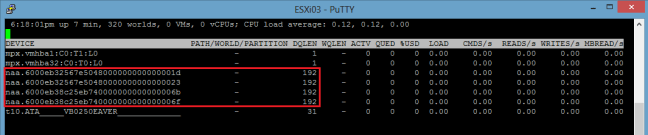
Let’s run the command esxcfg-module -s iscsivmk_LunQDepth=192 iscsi_vmk which will increase our Disk Queue Depth to 192.  Then reboot our ESXi Host.

Again, we need to verify that the Disk Queue Depth is 192 by running ESXTOP with the U command.
192 ESXTOP

Altered 192 Queue Depth

192 Queue Depth Results

So the results are in.  Let’s compare each test and see what the consensus is.

Comparison Results – IOMeter

The table below is colour coded to make  it easier to read.

RED – Higher Latency or Lower IOPS

GREEN – Lower Latency or Higher IOPS

YELLOW – Same results

IOMeter Results

Altering the Software iSCSI Adapter Queue Depth to 64 decreases latency by an average of 3.51%.  IOPS are increase on average by 2.12%

Altering the Software iSCSI Adapter Queue Depth to 192 decreases latency by an average of 3.03%.  IOPS are increase on average by 2.23%

Comparison Results – ESXTOP

The table below is colour coded to make  it easier to read.

RED – Higher Latency or Lower IOPS

GREEN – Lower Latency or Higher IOPS

YELLOW – Same results

ESXTOP Results

Altering the Software iSCSI Adapter Queue Depth to 64 decreases latency between Storage Device and Software iSCSI Initiator by an average of 0.06%.  VMKernel latency is increased by 501.42%.

Altering the Software iSCSI Adapter Queue Depth to 192 increases latency between Storage Device and Software iSCSI Initiator by an average of 6.02%.  VMKernel latency is decreased by 14.29%.

My Thoughts

The ESXTOP GAVG compares to the latency experienced by IOMeter for 32KB Block 100% Sequential 100% Read and 32KB Block Sequential 50% Read 50% Write.  I could put the differences down to latency in the Guest VM iSCSI queue. 

However, the differences between ESXTOP GAVG and IOMeter for 8KB Block 40% Sequential 60% Random 55% Read 35% Write and 8K Block 0% Sequential 100% Random 70% Read 30% Write are vastly different.  If anyone has some thoughts on this, that would be appreciated.

Overall altering the Software iSCSI Adapter Queue Depth to 64 gave a slightly performance increase for IOPS and latency, however not enough for me to warrant changing this full time in the vmfocus.com lab.

Final note, you should always follow the advice of your storage vendor and listen to there recommendations when working with vSphere.

My VCP5-DT Exam Experience

Disclaimer

Before I start this entry, I would like to point out that this isn’t for anyone who wants to know the answers to the exam questions as I won’t be disclosing any information about the content except for pointing you towards the VCP5-DT exam blueprint.

Interesting Stuff

I gave myself a personal objective to learn, understand, deploy and troubleshoot a View environment on 19th December 2012, with a ‘View’ pardon the pun to pass the exam in February 2013.

View was completely new to me, as I explained in is blog post, however it was something that had been on my radar for quite a while.  When it comes to learning a new subject, I have to confess I think I have a small case of OCD.  When I get involved, I get involved with both feet much to the annoyance of my ever understanding wife.  This means I spend at least two hours every day reading, labbing, listening or blogging about View until I’m ready for the exam.

Everyone learns a subject differently, however I’m getting to an age now where I have a tried and tested formula which works for me:

  1. Read it (someone else’s material)
  2. Lab it (implement it)
  3. Blog it (write about it to reinforce learning)
  4. Watch it (computer based training)
  5. Build it (build it again but better than the first time round)

I think it’s a good idea I expand on this a little, with the resources that I used to take my View understanding from very little, to a little bit more.

Resources

I cannot speak more highly of this book, it takes you from zero to hero and explains how all the View ‘cogs’ fit together.

This is a great View basics course, so you can see how the components fit together.  I also listed to this whist driving to client meetings to reinforce any items I had been labbing or didn’t really get from Barry’s and Mike’s book.  The only downside I would say to this is that one of the presenters had either been working too hard or not sleeping enough, as they appeared to yawn quite a lot.

Great blog by Christoph Harding which I found that when I ‘googled’ View questions was a leading resource to either provide answers or point you in the right direction.  I would highly recommend following thatsmyview.net RSS Feed or on Twitter @cdommermuth

This is the numero uno site for anything View related (in my opinion) and goes into great technical detail.  Again if you are interested in View, follow myvirtualcloud.net RSS Feed or on Twitter @andreleibovic

Lab

Your lab is key for the VCP5-DT exam, you need to build it, break it, fix it and build it again.

The hardware in lab my can be found over here.  A picture of my vCenter probably will speak a thousand words, it’s pretty straight forward really.

Infrastructure holds vCenter, DC and Veeam

View Infrastructure holds Connection Server, Security Server, Transfer Server and ThinApp Windows 7.

View LC Desktops are for Linked Clones Desktops

View LM Desktops are for Local Mode Desktops

Oh, before anyone asks, I have shares set on my Resource Groups.

View Lab

You will find yourself spending a lot of time in Active Directory if you really want to test out GPO’s and get the configuration just right.  Below is my OU configuration, pretty straight forward but it met all the requirements I had.

AD

You might say I went to town, as I ended up with 28 GPO’s!

GPO

One of the items I found particularly difficult to test was the Security Server as I don’t have a static IP Address.  I ended up registering for the no-ip.org service.  Which if you have a compatible router will update your DNS record automatically to your public IP Address.  This then enabled me to VPN into my router and then alter the External IP Address in View Administrator.

Perhaps not the most elegant of solutions, but it worked!

VCP5-DT Exam

Once I have completed all of the study materials and feel that I know each exam objective, it’s time for the exam.  I’m a morning person and therefore always book my exams first thing.  For some reason my local exam centre stopped offering the VCP5-DT and I had to make a 40 mile trip, which isn’t always the most pleasant, but it does take your mind of the exam trying to work out where to park.

I always approach exams the same way, I get to the examination centre round 30 minutes early, so you can go over the sign in process and hand over your valuables.  I then make three signs on the plastic sheet you are given

Tick – these are for questions I know I have definitely know the answers too.

Question Mark – these are questions I’m 80% plus sure on

Cross – these are questions I’m making an educated guess or generally haven’t got a clue on!

I try to aim for 30 seconds per question to give myself enough time to review questions at the end.  If I find I have spent over a minute on a question, I will mark it for review and then come back to it.  At the end of the exam, I only review questions I have marked for review not all of them.

The exam consisted of 85 questions over 90 minutes, which is a fairly tough time frame, but I’m pleased to say that I passed with a respectable 454/500.