

I nearly forgot that my CCNA was due to expire, but Cisco sent me a few reminders, well I say a few, it ended up bordering on spam. This meant that my efforts to gain the CCENT and the CCNA would soon be in demise and I would enter the realms of a ‘retired Cisco Certified Network Associate’.
With this in mind, I had a few choices to make:
Do Nothing this was close to being a front runner, however, if I’m being honest with myself, not being a Cisco Certified really bothered me. It was almost like riding your bike everyday and then one day your dad saying ‘you aren’t allowed on the bike anymore’. This thought process made we not want to loose the ‘bike’ in the first place.
Stay The Same to be fair this never really entered the equation. Since starting in IT, one thing that I have always enjoyed is moving forward with skills, projects, vendors and technologies. I don’t ever want to be a person who says I have 15 years experience in IT, well in fact, what you really meant to say is I gave up learning 12 years ago, so I only really have 3 years experience.
Move Forward this was the front runner, but I didn’t have enough time to self study as I had done before with the CCENT and CCNA (see blog posts CCENT Study Guide and CCNA ICND2 Study Guide) due to family and work commitments.
I spend some time over on CertForums and met a friendly fellow called Cisco Lab Rat who is the Owner/Senior Instructor at Commsupport. His forum posts impressed me and when my employer was looking for for a new Cisco training provider, I recommended Commsupport’s services.
A few of my colleagues have used Commsupport, and the feedback has always been top notch. So with this in mind, I decided to head to Commupport for my CCNA: Security training. I knew that it was going to be a tough week as Joe AKA Cisco Lab Rat performs the course over six days with the average day being 9:00am to 6:00pm.
One thing of note, is that I would highly recommend that you have either the CCNA or have configured Cisco ASA’s and Routers out in the field. During my time as an engineer I have been lucky enough to configure oodles of ASA 5510 in high availability and more site to site VPN’s than I could shake a stick at.
Anyway, back to the course, before it starts Commsupport provide you with access to there e-learning portal and they ask that you brush up on the basics so you are fully prepared for the course.
The course is held in Central Finchley (London) and this meant a two and half hour trek, door to door. The first day was a Sunday which I have to say isn’t generally the trend in IT courses, but it was welcomed as I knew we had a lot of information to cram in.
The Commsupport offices are OK, they aren’t the Ritz but they certainly aren’t the ghetto. You have to bear in mind the course cost, along with the equipment being used and the technical expertise giving the training.
Upon arrival, I was greeted by a slightly over excited Joe! He instantly made me feel welcome and offered me a seat in front of a stack of Cisco equipment.
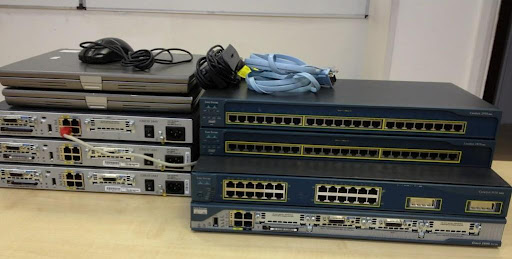
I was surprised by the amount of equipment we had to use:
3 x Cisco 1841 Routers
1 x Cisco 2801 Router
1 x Cisco 3560
2 x Cisco 3550
1 x Cisco ASA 5510
2 x Laptops
Normally, in most courses I attend, you have the initial meet and great, with the ‘Hi I work for x and do y’. None of this, we cracked straight on with Cisco.
The way that Joe teaches you is excellent, he has a passion for networking, Cisco and ranting about random topics. The overall work flow for each day is really structured, essentially, you have.
Step 1 – Joe Talks
Joe talks over the days plan giving us an overview of what we are going to achieve e.g. Client less SSL VPN from ASA over two routers with two lots of NAT.
He then draws out the network diagram and talks over the concepts of each area e.g. why you would use an SSL VPN rather than L2TP IPSEC or PPTP.
Step 2 – Joe Does The Lab
This part is cool, Joe then puts together the lab and explains all the IOS commands, ensuring you understanding what he is doing and why.
Step 3 – You Do It
Joe prints you out a set of instructions to configure your lab, this includes parts from the GUI (if you like that sort of thing) and also CLI. One of the aspects that I really enjoyed was when you couldn’t get something to work Joe would spend the time and help you troubleshoot the issue.
Conclusion
Overall it was an excellent week, I gained a much deeper understanding of what it actually was that I was configuring rather than just making it work. Joe’s ability to convey very technical information in a humorous fashion is second to none. The lab you have to use is fantastic and the ability to access Joe before and after the course really helps when you have questions you are unsure off.
Would I recommend the CCNA: Security at Commsupport, yes definately.
Topics Covered
Common Security Threats
Describe common security threats
Security and Cisco Routers
Implement security on Cisco router
Describe securing the control, data, and management plan
Describe Cisco Security Manager
Describe IPv4 to IPv6 transition
AAA on Cisco Devices
Implement AAA (authentication, authorization, and accounting
Describe TACACS+
Describe RADIUS
Describe AAA
Verify AAA functionality
IOS ACLs
Describe standard, extended, and named IP IOS access control lists (ACLs) to filter packets
Describe considerations when building ACLs
Implement IP ACLs to mitigate threats in a network
Secure Network Management and Reporting
Describe secure network management
Implement secure network management
Common Layer 2 Attacks
Describe Layer 2 security using Cisco switches
Describe VLAN security
Implement VLANs and trunking
Implement spanning tree
Cisco Firewall Technologies
Describe operational strengths and weaknesses of the different firewall technologies
Describe stateful firewalls
Describe the types of NAT used in firewall technologies
Implement zone-based policy firewall using CCP
Implement the Cisco Adaptive Security Appliance (ASA)
Implement Network Address Translation (NAT) and Port Address Translation (PAT)
VPN Technologies
Describe the different methods used in cryptography
Describe VPN technologies
Describe the building blocks of IPSec
Implement an IOS IPSec site-to-site VPN with pre-shared key authentication
Verify VPN operations
Implement Secure Sockets Layer (SSL) VPN using ASA device manager

 VMFocus