How To: Rehost HP StoreVirtual Licenses

I’m not sure exactly when, but HP changed the licensing portal from ‘Poetic’ to a new portal named ‘My HP Licensing Portal’.  All of the information looked exactly the same, however you could not rehost HP StoreVirtual Licenses.

The purpose of this blog post is to assist anyone who was in the same situation as me, scratching their head trying to figure it out!

Problem

You have an existing HP StoreVirtual license which ties the feature set to the first NIC MAC address on your StoreVirtual VSA.  You have changed, upgraded or redeployed your VSA and you need to rehost the license onto the new MAC address.

Solution

Browse to myhplicensing.hp.com and login for your email address and password that you use for your portal account.

Note: If you are not sure what email address is tied to your account login to HP Licensing for Software and select Administration > My Profile which will show your email address.

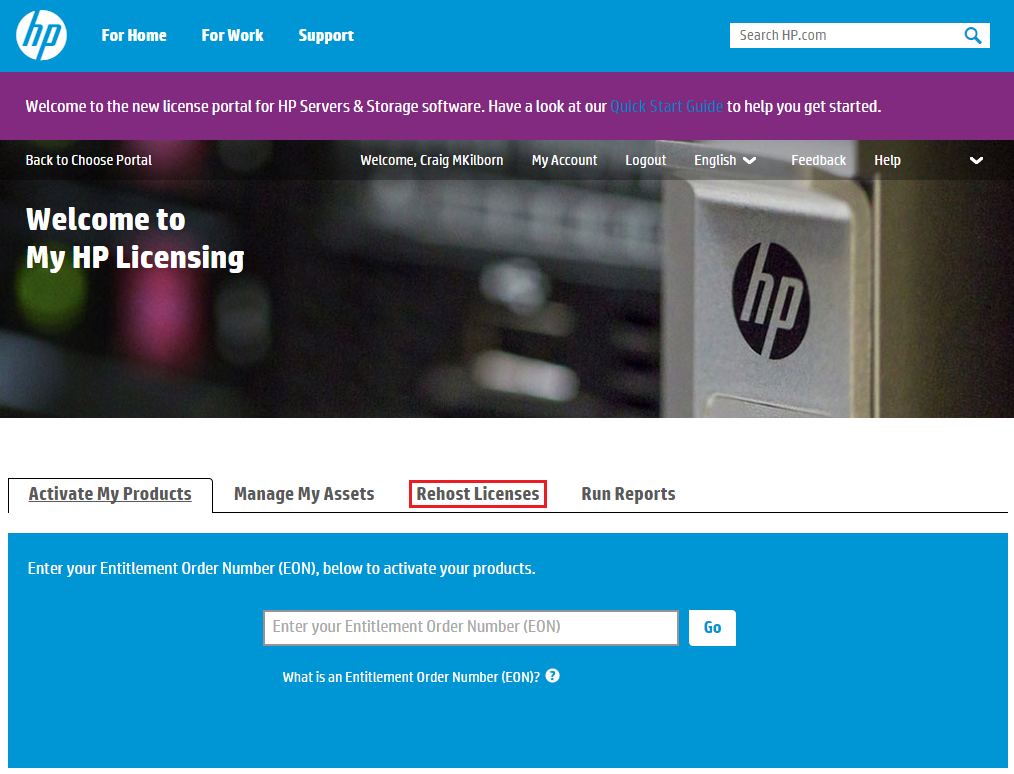
Once logged into My HP Licensing select Rehost Licenses

StoreVirtual License 01

Next select Rehost Licenses and click on the MAC Address you want to update

StoreVirtual License 02

Select the tick box to confirm this is the license that you want rehosting and then click Rehost.

StoreVirtual License 03

Select ‘Enter New Locking ID’ and enter the MAC Address of the first network adapter on your StoreVirtual.  Then click Next

StoreVirtual License 04

This bit takes a while but once done you will receive the license file which can be saved or emailed

StoreVirtual License 05

How To: HP StoreVirtual LeftHand OS 12.0 With T10 UNMAP

HP have announced the release of LeftHand OS 12.0 which finally includes T10 UNMAP which means we can now start and stay thin with StoreVirtual.

A list of feature enhancements are:

  • Space Reclamation
    • Reclaim space on thinly and fully provisioned volumes used by Windows Server 2012 or later, and vSphere 5 or later
  • StoreVirtual Multi-Path Extension Module (MEM) for vSphere
    • Provides data path optimization similar to StoreVirtual DSM for Microsoft MPIO
  • REST API for StoreVirtual
    • Enables automation and scripting of clusters, provisioning and volume management
  • StoreVirtual VSA Term LicenseManagement
    • Enforces term licensing for StoreVirtual VSA

So lets take LeftHand OS 12.0 for a spin and test out T10 UNMAP.

Centralised Management Console Upgrade

The first step is to upgrade your Centralised Management Console to LeftHand OS 12.0.  Once done, you will be greeted by your new 12.0 screen.  First impressions, it is a lot faster to discover StoreVirtual nodes and access Management Groups, well done HP!

StoreVirtual Node Upgrade

Just a word of warning, I would always recommend performing upgrades out of hours as when a StoreVirtual node reboots you will loose a percentage of your clusters performance e.g. if you have two nodes in your cluster and your reboot one, then you will loose approximately 50% of your performance.

The good news for those that are using physical StoreVirtuals, HP have reduced the reboot time.

When you are ready to upgrade, the procedure is as slick as always.  Download your updates via the CMC and then apply them to your nodes one at a time.

Enable Space Reclamation

Space reclamation is enabled manually at the Management Group level.  Right Click your Management Group and Select Enable Space Reclamation

Space Reclaimation 01


Next we receive a warning that once upgraded you cannot downgrade to previous versions of LeftHand OS that do not support space reclamation.

Enter your Management Group name, in my case DC01-MG01 and accept the disclaimer and enable Space Reclamation.

Space Reclaimation 01

I suggest checking your Device and RAID status to ensure everything is OK before moving forward.  This is done by selecting your Cluster, followed by the Node and then selecting Storage.  As you can see I have Adaptive Optimisation enabled and my RAID Status is normal.

Space Reclaimation 03

Space Reclamation Test

Space reclamation can be performed either on vSphere after a Storage vMotion has taken place or when files have been deleted from with a guest operating system.

In this test I’m going to perform a Storage vMotion from one datastore another and then zero the space on the VMFS file system.

The test is going to be ran on the datastore DC02-NODR02 which has a single virtual machine inside of it, with the following storage storage characteristics:

  • Datastore DC02-NODR02
    • Capacity 199.75GB
    • Provisioned Space 45.01GB
    • Free Space 177.29GB
    • Used Space 22.46GB

Space Reclaimation 08

  • Volume – 17.50GB consumed space
    • 200GB Fully Provisioned with Adaptive Optimisation enabled

Space Reclaimation 09

Next I’m going to perform a Storage vMotion of the virtual machine onto the datastore DC02-NODR03.  Time to grab a cup of tea before we move on and run VMKFSTools to reclaim the space.

VMKFSTools

Now the Storage vMotion has finished, we need to run vmkfstools on the datastore to reclaim the space.  Jason Boche has an excellent blog post entitled ‘Storage: Starting Thin and Staying Thin with VAAI UNMAP‘ on the vmkfstools command.

On an ESXi Host that can see the datastore DC02-NODR02, I’m going to run the command ‘vmkfstools -y 90’

Space Reclaimation 10

Note in a production environment you would reclaim the space out of hours and use 60% of the available space

If we now check the volume DC02-NODR02 it’s consumed space is 0.46MB which is the VMFS file system

Space Reclaimation 11


Monitoring Space Reclamation

HP have introduced some extra performance statistics to enable space reclamation to be monitored which include:

  • IOPS Space Reclamation
  • Latency UNMAP

These can be accessed by added to the Performance Monitor window so that you can verify the effect of space reclamation on your StoreVirtual node.

Space Reclaimation 12

Certification Hamster Wheel?

Disclaimer: This is a copy of the post that I made for TechTarget recently.

The first part of this blog post relates to some general thoughts about certification in general.  If you only want to know about VMware certification changes, I suggest you jump down to that section!

VCAP

Certification Thoughts

I have often thought that being in the IT industry is like being on hamster wheel, with continual momentum from vendors to obtain market share drives innovation in new products and offerings which in turn leads to us IT professionals needing to update our skills.

In most professions you have to learn new skills overtime, if we take the example of a car mechanic.  The cars they were servicing ten years ago had four wheels, an engine, a steering wheel and doors.  The cars today follow suit, however they are more complex with electronic braking systems, traction control and automatic windscreen wipers.

The same can be said for IT, you have an application that requires CPU, Memory and Disk.  How these are delivered to the application have changed with abstraction from the physical layer, hyperthreading and storage either local or remote.

However the biggest difference is certification, I don’t know of any industry which focuses on the collection and updating of certificates as we do.  I mean we are pretty obsessed by it (but with good reason).

Job Security

No longer is there such a thing as a job for life, companies get bought, sold, go bust, relocate…. the list goes on.  Most of us require an income to pay for our houses, cars and living expenses.  So how do we differentiate ourselves from the rest of the market?  This is when certifications and experience come into play.

Now I’m not and never have been a recruiter, but human nature dictates that we normally go for the least line of resistance.  Often a company will state a certain level of certification is required for a position, as a recruiter what are you going to do when performing searches on LinkedIn or reviewing CV’s?  Yep you are in the ‘review’ pile if you have the certification and in the ‘bin’ pile if you don’t.

Investment

Passing a certificate isn’t just about achieving a certain pass mark, it shows others that you are serious about your career.  To gain the qualification you will have either spent your own time and money (or if you are lucky enough the companies whom you work for) on the following:

  • Course
  • Books related to the subject
  • Exam fees
  • Home lab
  • Time of work to take exam
  • Personal time studying

For me, I will continue on the certification hamster wheel for the foreseeable future.

VMware Certification Changes

With the release of NSX and vSphere 6, VMware have made some changes to the certification track with the most noticeable being the replacement of VMware Certified Advanced Professional certification with VMware Certified Implementation Expert.

Information is a slightly vague at the moment, but this is what we know:

  • VCAP will be retired at some point
  • VCIX certification requires you pass both a design and administration exams
    • If you hold a single VCAP their will be an upgrade path to pass the remaining VCIX exam e.g. VCAP5-DCA pass the VCIX Design exam to gain VCIX-DCV
    • If you hold both VCAP’s in a certification track, an upgrade to VCIX will be available
  • Each VCIX exam will be the same length as VCAP exam
  • Each VCIX exam will be the same price as a VCAP exam

My view is that the exam length is slightly to long, having to focus for 3 hours plus is always a struggle.  On the flip side I can see a reduction in the number of people aiming for VCIX as you don’t obtain the qualification until you pass both exams.

A colleague of mine Toby Brown stated that this reminded him of the old Microsoft MSCA/MSCE track, which I have to agree with.

No Singapore/Frimley VCDX Workshops – Vote to Change

White Clouds SmallVMware released the VCDX 2015 defence dates on 7th January 2015 see my blog post here.  VMware have decided to organise three defence locations at Palo Alto (USA), Frimley (UK) and Singapore (Asia).

It would seem logical then to have VCDX Workshops in these three locations as they are chosen for the defences.  However this is not the case and Chris Colitti @ccolotti and Karl Childs @karlchilds has released the 2015 VCDX Workshop Dates and out of the thirteen dates announced, only two are outside the US which are

  • Toronto
  • Netherlands

I understand that the VCDX Workshops are take time, effort and expense to run.  However, I would like to use this blog post as a conduit to raise awareness to Chris Colitti and Karl Childs understand the demand for these types of workshops in the UK and Singapore.

So if you are interested in a VCDX workshop in one of these locations, please vote below so we can track the data and share with VMware.

**Update 1**

Thank you to Chris Colotti for the responses below and for his blog post VCDX Workshops & VCDX Prep Class that provides details on the extra resources available to VCDX candidates.

**Update 2**

Chris Colotti has since announced the first VCDX Workshop which will take place on Friday 13th March 2015 at 14:00 UK time.  To register for the event follow the link here.

Horizon View License Upgrade Tool

The past eighteen months has seen huge investment by VMware within the EUC space, with the arrival of Sanjay Poonen and Horizon (with View) 6 which introduced application publishing in the Advanced edition.  Finally we had an emerging contender to the heavy weight Citrix XenApp.

With this investment from VMware, the past twelve months have seen an increased number of customers looking at virtualizing desktops and applications, this has lead to an increased conversations about how to upgrade existing licenses and the best route to take depending on what features are required and what license model.

  • Per Named User
    • For virtual environments with staff that need dedicated access to a virtual machine throughout the day
  • Per Concurrent Connection
    • For virtual environments with a high number of shift workers where machines are shared between workers throughout the day (e.g. students, shift workers)

VMware have caught onto the minefield and have released the VMware End User Computing Upgrade Path Tool  which will show you what SKU’s are required to move to Horizon 6.

UpgradePaths